

Overview legend
Overview legend
Introduction
a3ERP is an enterprise resource planning (ERP) software for small and medium enterprises in Spain, unifying accounting, invoicing, sales, inventory, CRM, and payroll on one platform. It runs on the client’s own server, and the Chift connector reaches it through a local agent installed there.Activate a3ERP
Partner keys
No partner keys and no approval: the connector is ready to use.Activate a3ERP in your Chift account
One click in Connectors, then create connections straight away.
Connector settings
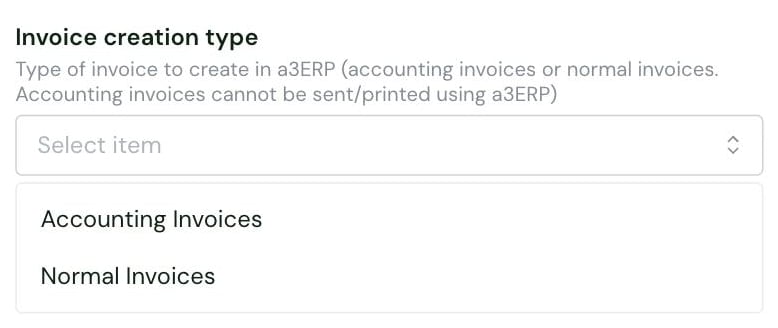
- Accounting Invoices (default): Chift creates accounting invoices. They cannot be sent or printed from a3ERP.
- Normal Invoices: Chift creates normal invoices.
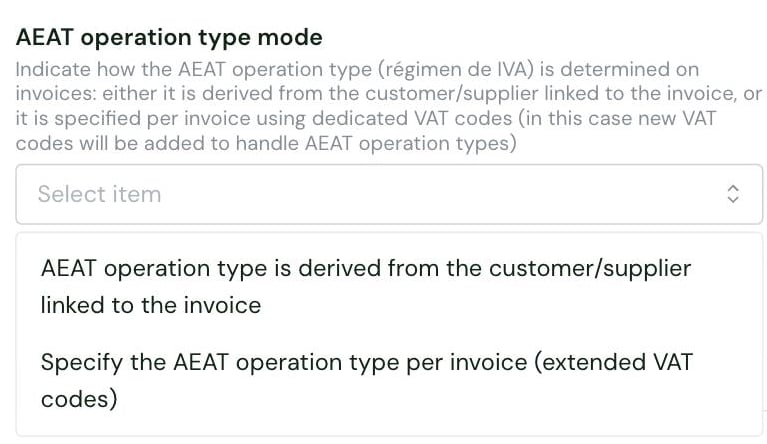
- AEAT operation type is derived from the customer/supplier linked to the invoice (default): the operation type comes from the customer or supplier on the invoice.
- Specify the AEAT operation type per invoice (extended VAT codes): you set the operation type on each invoice.
<code>_<operation type>.
Test a3ERP
Vendor fees
No vendor fees, for you or your end users.
Connect a3ERP
a3ERP setup guide for end users
The full step-by-step, with screenshots.
Local agent guide
Installing and running the local agent.
- a3ERP version 14.5.2 or later, with .NET Framework 4.8 installed on the server running a3ERP
- an a3ERP user and password with access to the company they want to connect
- a Windows admin account, to install the local agent on the a3ERP server
- the local agent installed on the same server as a3ERP, not on another machine
- if a3ERP data sits on a network drive, the A3ERPService Windows service running under an account with access to that drive
- Enter their a3ERP username and password. If the form shows them, they also choose the default analytic plan, the invoice creation type and the AEAT operation type mode.
- Download the installer, or have it emailed to whoever performs the installation.
- Specify the company code of the a3ERP entity to connect. The code is shown on a3ERP’s company selection screen, the first screen a3ERP displays.
- Run the installer on the a3ERP server.
Rate limits
No rate limit documented by a3ERP.Limitations & specificities
Invoices
Invoices
Invoice numbers can only contain digits.
Journal entries
Journal entries
- Journal entries can only be posted to a3ERP journals, the diarios. Chift returns them with type
miscellaneous_operation. - The customer and supplier journals that stand for a3ERP invoice series cannot receive journal entries.
- A line on an employee account is rejected.
Chart of accounts & VAT
Chart of accounts & VAT
Rules on the AEAT operation type, the régimen de IVA. Otherwise, a3ERP rejects the invoice:
- All lines of an invoice use the same operation type, since a3ERP carries it at the invoice header level.
- With a reverse-charge operation type, the VAT amount is 0.
- When AEAT operation type mode is set to extended VAT codes, the operation type matches the invoice: a purchase type on a supplier invoice, a sales type on a customer invoice.
Multi-folder
Multi-folder
Not supported: each connection covers a single a3ERP company, chosen by its company code when connecting.