

Overview Legend 🧭
Overview Legend 🧭
Introduction
Pennylane is a French accounting and financial management platform for businesses and their accountants. The Pennylane Firm connector uses Pennylane’s Firm API, built for accounting firms: one connection gives access to the client companies in the firm’s portfolio.Activate Pennylane Firm
Partner keys
You’ll need your own OAuth2 app, registered with Pennylane. Sandbox and production credentials are the same on Pennylane’s side. Before going live, your integration must be certified by both Chift and Pennylane. Chift can help you at every step.1
Open the partnership and get sandbox access
Fill in the partnership form:
- Question 4 — which entity will develop the connector? Select Chift.
- Question 5 — do you have access to the Pennylane sandbox? Select No, open access for me, then enter the email address to link to the sandbox in question 5b.
2
Get your OAuth2 credentials
Fill in the OAuth2 request form to receive your Client ID and Client Secret:
- API: select the Firm API.
- Scopes:
- Always request
companies:readonly,journals:readonly,ledger_accounts:readonlyandledger_entries:readonly. - Add
fiscal_years:readonly,trial_balance:readonly,exports:fecorcategories:readonlyif your integration also needs fiscal years, the trial balance, FEC exports or categories. - Then enable the same optional scopes in the Chift connector settings, as described under Connector settings.
- Always request
- Callback URL:
3
Certify your integration
Fill in the pre-certification form, then ask Chift to schedule a meeting with Pennylane. In that meeting you present a demo of your integration, with Chift on the call for technical questions.
4
Get listed on Pennylane's marketplace (optional)
To appear on Pennylane’s public marketplace and in-app, and benefit from their communication about your partnership, fill in the app-listing form.
Activate Pennylane Firm in your Chift account
In Connectors, enter your Client ID and Client Secret.
Connector settings
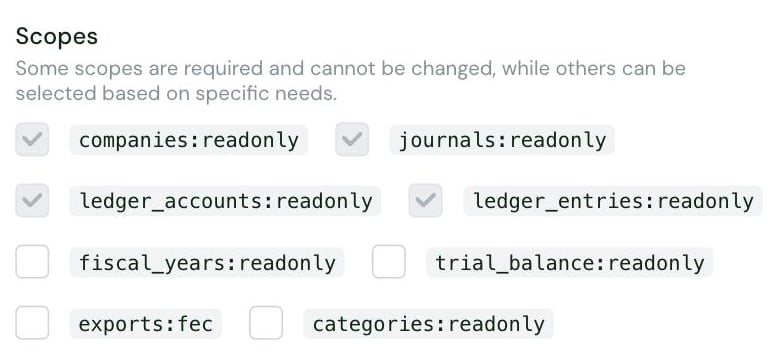
fiscal_years:readonly: fiscal years.trial_balance:readonly: the trial balance.exports:fec: the FEC export.categories:readonly: categories.
Test Pennylane Firm
Vendor fees
No vendor fees, for you or your end users.
Connect Pennylane Firm
Pennylane setup guide for end users
The full step-by-step, with screenshots.
- a Pennylane account for their accounting firm
- sign in to Pennylane and authorize access to their firm’s portfolio
- optionally choose one or more companies to connect under Company. If they choose none, every company in the firm’s portfolio is available
Rate limits
Pennylane allows 5 requests per second on the Firm API, on all endpoints, in production and sandbox. When the limit is exceeded, Pennylane returns HTTP429 Too Many Requests and asks to retry after 60 seconds.
Chift automatically manages these limits to optimize performance and prevent interruptions. However, once the API rate limit is reached, Chift cannot bypass these limitations.
See Pennylane’s Firm API rate limit documentation.
Limitations & specificities
Multi-folder
Multi-folder
The connector reads across the firm’s portfolio: every call must say which client company it targets.If one or more companies were chosen when the connection was created, only those are reachable. Any other company returns a not-found error.
Other
Other
The FEC export needs the
exports:fec scope. Request it from Pennylane and enable it in the connector settings in Chift before the end user connects.Chift waits up to about 60 seconds for Pennylane to produce the export before returning a timeout error.