PREREQUISITE
- You need to preconfigure your user rights and find your API information by doing the preparation steps 1 and 2 described below.
- Be a Hiboutik “Premium” client.
(Warning: Hiboutik does not allow data retrieval via the API for dates prior to the subscription period)
PREPARATION
-
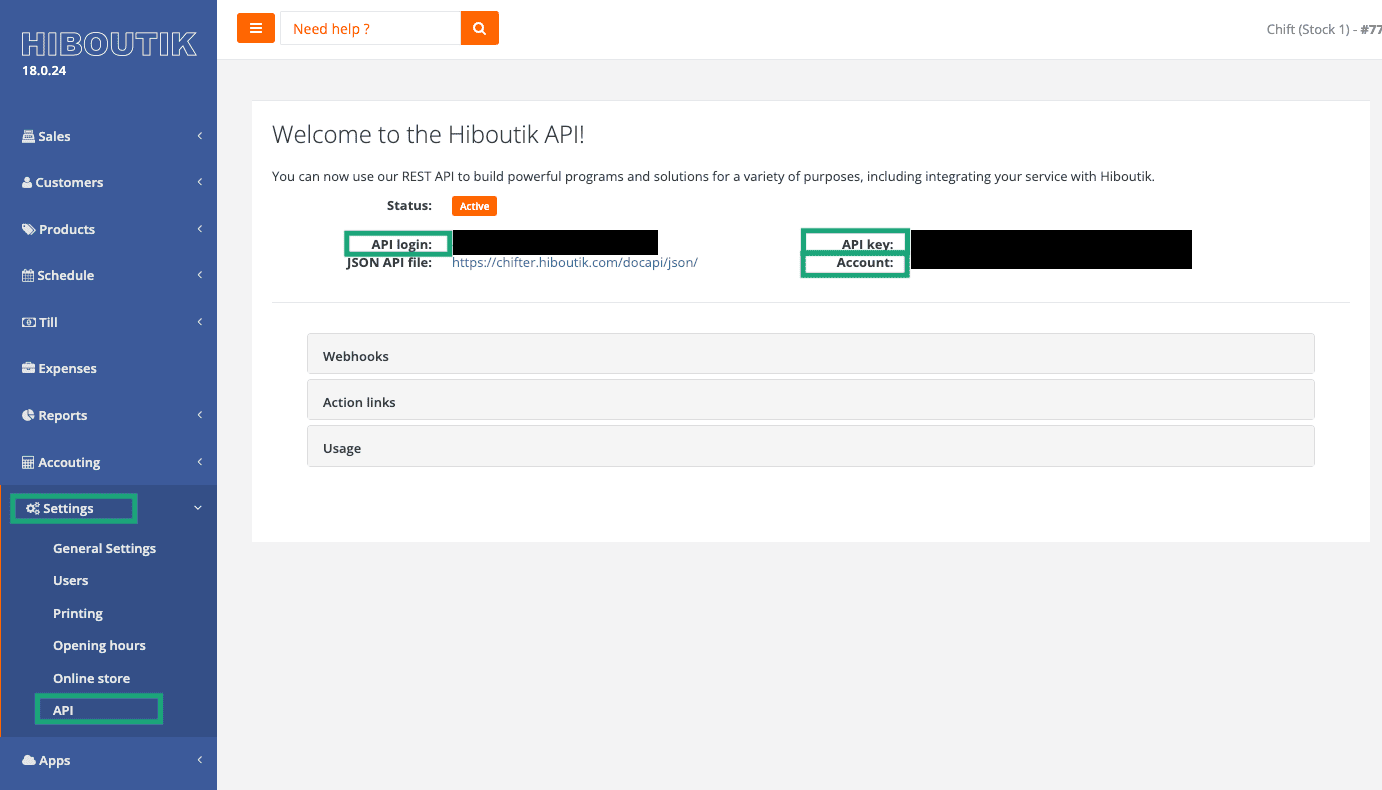
Find your client API information:
- API login
- API Key
- Account
2. Configure your account permissions (the user account corresponding to the API login email)
You can find the permissions of the users by going to the tab Settings > Users > Access management and by checking the permissions of the user that you are going to use to create the connection. To be able to create the connection to your Hiboutik account, the account that you are going to use needs to have the following permissions:-
- Sales Tab
-
- Show pending sales
-
- Show validated sales
-
- Customers Tab
-
- Products Tab
-
- Syntheses Tab and all sub permissions enables
-
- Show summaries: monthly, annual, customers, stock and others
-
- Onglet Paramètres
-
- Manage point of sale identification
-
- Manage VAT rates
CONNEXION
Step 1: Choose a name for your connection.



CONFIGURATION
Step 1: Select your point of sale.