

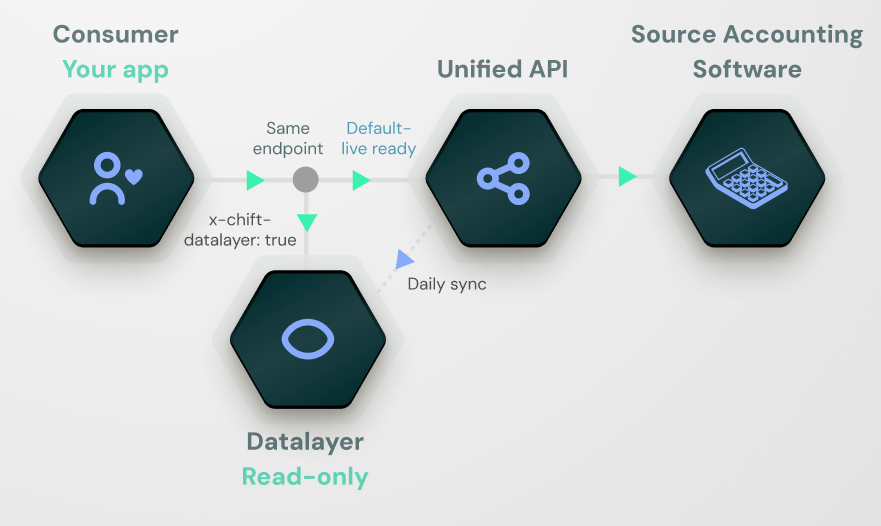
How it differs from the unified API
By default, every call you make to a Chift unified endpoint is transactional: Chift forwards the request to the third-party system in real time, normalizes the response, and returns it. When you send the request with thex-chift-datalayer: true header, the same call is served from Chift’s data layer store, which a background sync keeps up to date. The sync contacts the source system, not the request itself.
Because the choice is made per request, the same connection can serve both live and data layer reads side by side. If you need a record back the instant you’ve written it, simply omit the header on that read; if you’re paginating through history, send it.
When to use the data layer
The data layer is the right choice when you want:- Fast, consistent read latency that doesn’t depend on the load or availability of the source accounting system.
- To page through large amounts of historical data (entries, invoices, partners) without hitting the source on every page.
- To run heavier read patterns (filtering, date ranges, multiple folders) at a higher rate than the source would comfortably allow.
- To decouple your read traffic from the source system’s rate limits and downtime.
What’s covered today
The data layer covers the Accounting, Point of Sale and Banking unified APIs. Within each, the standard resources are available: Accounting- Folders
- Chart of accounts (ledger accounts)
- Journals
- Journal entries (and lines)
- Invoices (and lines, payments)
- Partners (clients and suppliers)
- VAT codes
- Book years
- Analytic plans
- Locations
- Customers
- Products, product categories and accounting categories
- Taxes
- Payment methods
- Orders (and lines, payments)
- Financial institutions
- Financial accounts
- Transactions
How freshness works
The data layer is populated by a sync attached to the connection. The sync runs on a defined cadence and writes the records it pulls into the data layer store. How much it pulls on each run depends on the kind of entity:- Time-series entities (accounting journal entries and invoices, POS orders, banking transactions) are synced incrementally. Each run pulls only the records created or changed in the source since the previous run. A configurable lookback window also re-pulls recent history to catch late edits and backdated changes. This keeps each run fast even as history grows.
- Reference data (folders, locations, chart of accounts, journals, partners, product catalogs, VAT codes, book years, financial institutions and accounts) is fully re-synced. These sets are small and change rarely, so every run refreshes them in full rather than tracking deltas.
- Reads with the header always reflect the last successful sync. If the source has changed since the last sync ran, those changes are not yet visible through the data layer.
- Reads without the header are always live, so a write-then-read flow that needs the freshest state simply skips the header on the read.
- The sync cadence is configurable per connection and is agreed with your CSM/SE when the feature is enabled (see Activating the data layer).
Refresh webhooks
You can subscribe to webhooks to know exactly when a data layer refresh runs, so you can react when fresh data becomes available (for example, kick off downstream reporting jobs once a refresh completes). Chift emits four events, once per consumer, around each refresh:account.datalayer.refresh_initiated— sent when a refresh starts for a consumer.account.datalayer.refresh_executed— sent when the refresh finishes for that consumer, with astatusofsuccessorerrorindicating how it ended.account.datalayer.data_changed— sent after a refresh, listing which resources were created or updated in that run.account.datalayer.data_deleted— sent after a refresh, listing records that were removed from the data layer in that run.
accountid, consumerid, created, …) plus the connectionid of the connection being refreshed, the api the sync refreshes (e.g. Accounting), and a scope describing the part of the source the refresh covers. The scope shape depends on the API. See Webhooks for the full payload format and how to verify the signature.
Reconnecting to a different account
A connection keeps the same id even if its credentials are later re-entered to point at a different source account. When the sync detects that the connected account has changed (a genuine swap, not a routine re-authentication of the same account), it wipes the connection’s data layer store and rebuilds it from scratch on that run. That way, data from two different accounts is never mixed. If you mirror the data layer into your own store, treat this like any other refresh: the run emits the usualaccount.datalayer.data_deleted and data_changed events, and a periodic full fetch reconciles anything you might have missed (see Fetching data). Re-authenticating the same account leaves the store untouched.