

It is intended for developers managing consumer connections in Chift.
Monitor connection status
Once the activation link has been shared, you need to verify whether the connection was successfully established. There are several options:1. Webhook
Subscribe to theaccount.connection.created event.Triggered automatically when the connection becomes active.
⚠️ Important:Webhook Docs ↗️
Theaccount.connection.createdwebhook is only triggered when the connection has been successfully created.
If the consumer never completes the activation, no webhook event will be sent.
We therefore recommend combining this with another logic — for example, a timeout or periodic check — to handle incomplete activations.
2. API call
Retrieve all connections linked to a consumer and check theiractive status.
Endpoint: Get connectionsAPI Reference ↗️ Required field:
consumerId— From the consumer creation step
3. Redirect URL parameters
If aredirect_url was set when creating the consumer, Chift automatically appends query parameters when your end-user is redirected after activation.
Returned parameters:
consumerIdconnectionIdconnectionStatus(active/inactive)error(only in case of error)isExpiredError(only in case of error)
Update an existing connection
⚠️ Pro tip: Do not delete and recreate a connection if credentials expire or activation was not completed.Instead, use the update endpoint to resend the activation link or adjust metadata (e.g.
name, redirect_url).
Endpoint: Update an existing connectionAPI Reference ↗️ Required fields:
consumerId— From consumer creationconnectionId— From connection creation
Updating a connection allows you to maintain active links without forcing your end-user to reconnect from scratch.
This preserves historical data and ensures smoother API usage.
Connection lifecycle
A connection is either active or inactive. Only an active connection can serve Unified API calls. Chift manages the status for you: it moves through the lifecycle automatically as your end-user completes activation, as credentials are refreshed, and as they expire or are revoked. The API and webhooks give you visibility into every transition so you can build the right experience around it.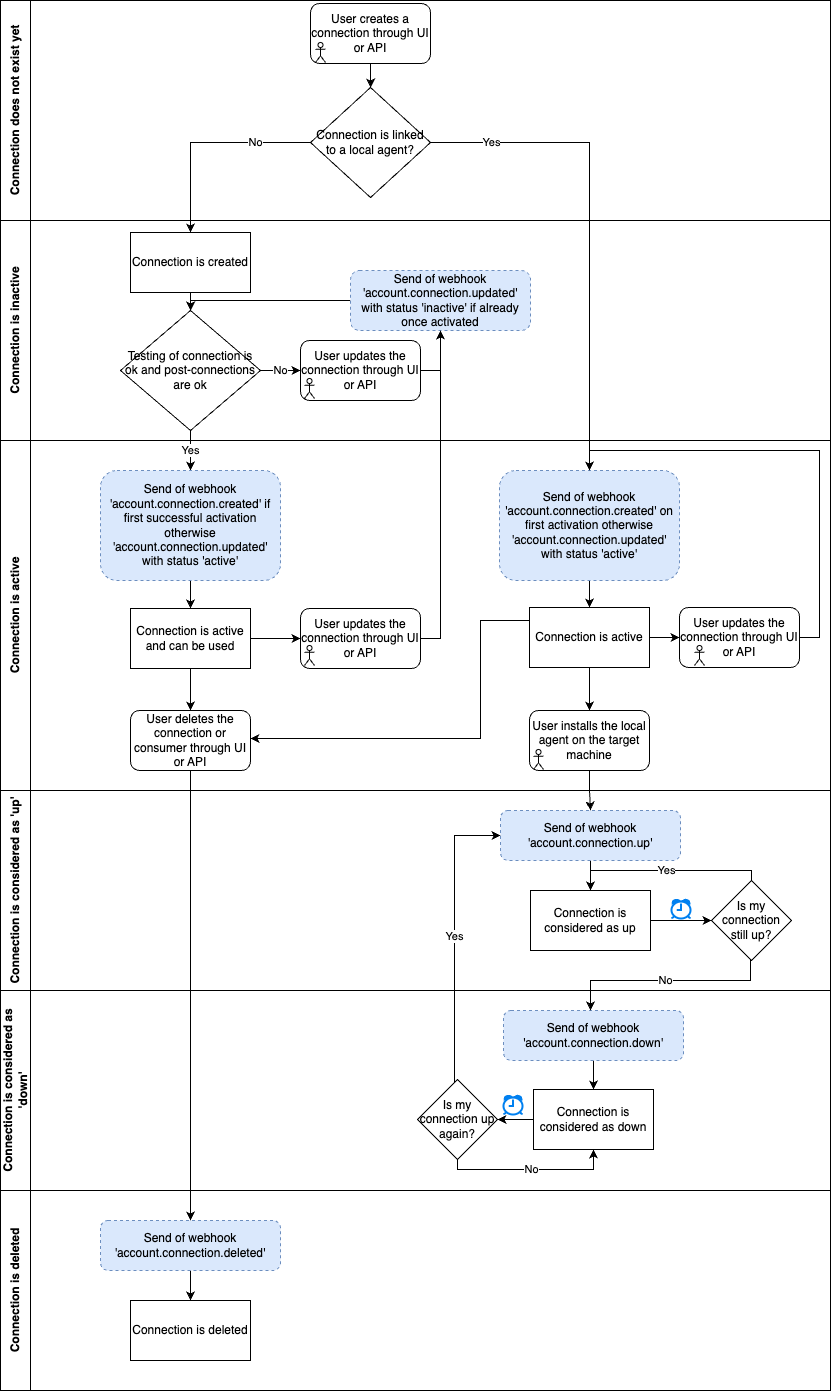
Post-connections
Some connectors ask follow-up questions after the credentials are accepted — choose the POS location, choose the accounting folder. These are called post-connections, and they exist because the available options can only be read once the connection works. Some are mandatory; others you can switch on per connector in its settings, depending on how much you want to delegate to Chift.GET /integrations returns each connector’s post_connections so you can see what your end-user will be asked.