

Start an execution
You can start an execution in two ways:- From the Platform: open the consumer page and click the play button next to the sync. See Trigger an execution.
- With the API: call
POST /syncs/{syncid}/flows/{flowid}/execute.
Without
settings, the flow runs as configured for each consumer. The response returns the chainexecutionid, the resolved_settings and the warnings of the execution.
Chift runs one execution at a time for a flow and a consumer. A request during a running execution returns a
409 with ERROR_EXECUTION_ALREADY_RUNNING.Options
The options are the same for all syncs. Each option controls one thing and does not change the others.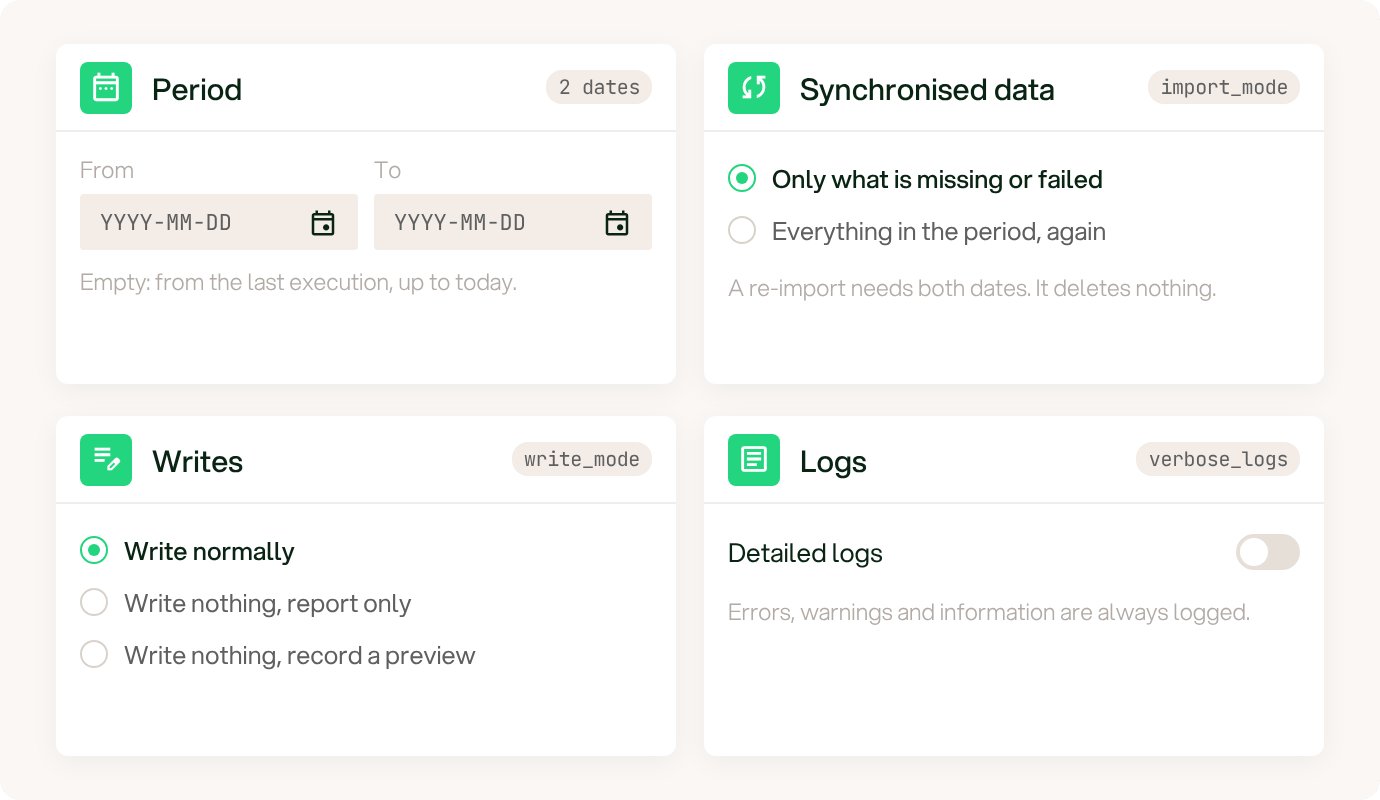
The four common options of a manual execution, with their default values.
Period: force_from_date and force_to_date
Period: force_from_date and force_to_date
force_from_date is the first day of the period. The execution starts from this date instead of the point where the last execution stopped. It ignores the lookback limit of the sync and the start date of the configuration.force_to_date is the last day of the period. The execution stops at this date instead of today.Both dates use the format YYYY-MM-DD. A forced period does not move the cursor of the sync, so the next scheduled execution is not affected.Synchronised data: import_mode
Synchronised data: import_mode
normal(default): the execution exports only the data that is missing or failed.force_reimport: the execution exports everything in the period again, also the data that is already synchronised.
force_reimport needs both force_from_date and force_to_date. Without them, the request returns a 422.A re-import never deletes data in the target software. See Export a period again.Writes: write_mode
Writes: write_mode
normal(default): the execution writes in the target software.debug: the execution writes nothing. It reports what the next real execution would do.preview: the execution writes nothing and records what it would create. It needs bothforce_from_dateandforce_to_date. Only the flows that allow previews accept it. See Ledger preview.
Logs: verbose_logs
Logs: verbose_logs
true adds the debug logs to the execution logs. The default is false. Errors, warnings and information are always logged.Options of one sync
Options of one sync
A sync can add its own options. For example,
location_ids limits an execution of the POS sync or the PMS sync to some locations.Pass these options in settings, next to the common options. List the options of a flow to find them.Common cases
These are the requests for the most frequent needs. Each example shows thesettings object only.
Import the missing data now
Send nosettings. The execution does the same as a scheduled execution: it exports what is missing or failed.
Import a period that was skipped or failed
Pass the two dates of the period. The execution exports only what is missing or failed in this period.Export a period again
Pass the two dates andforce_reimport. The execution exports everything in the period again.
Test without writing
Passdebug. The execution writes nothing and reports what the next real execution would do.
Check a request first
Send the same request with"preflight": true to check it before you run it. Chift checks the request the same way and starts nothing.
blockedistruewhen the same request, sent for real, is refused.warningslists what you need to know. Each warning has acode, amessageand ablockingflag.
A real execution returns the same warnings in its response.
List the options of a flow
Not every sync accepts every option. CallGET /syncs/{syncid}/flows/{flowid}/settings to read the options that a flow accepts.
Use the
language query parameter to select the language of the titles and the explanations. The default is English.
A request with an option that the flow cannot apply returns a 422 with ERROR_SETTING_NOT_APPLICABLE. The message names the option.
For a flow with configurable at false, see Send a custom event for a specific flow (deprecated).
API reference: Settings this flow accepts when you run it ↗