> ## Documentation Index
> Fetch the complete documentation index at: https://docs.chift.eu/llms.txt
> Use this file to discover all available pages before exploring further.
# Embedded connector-picker
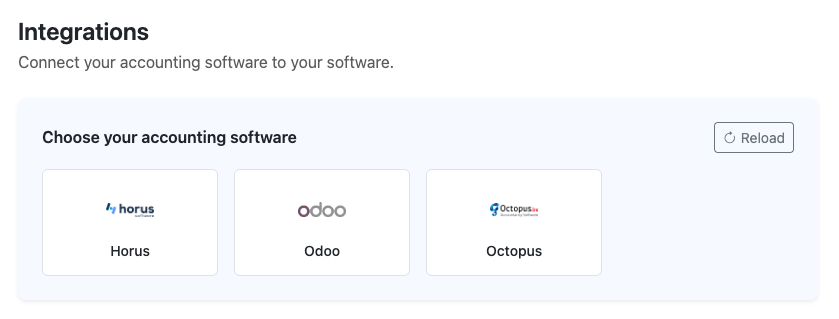
You show the list of connectors inside your own product. Your end-user picks their software there, then connects it on the Chift connector page.
 Create one consumer per end-user. Store the returned `consumerid` on your end-user record. You reuse it for every connection that end-user makes.
```bash theme={null}
curl -X POST https://api.chift.eu/consumers \
-H "Authorization: Bearer YOUR_ACCESS_TOKEN" \
-H "Content-Type: application/json" \
-d '{
"name": "Your end-user's company name",
"internal_reference": "your-internal-end-user-id",
"email": "contact@your-end-user.example",
"redirect_url": "https://yourapp.example/integrations/callback"
}'
```
| Field | Required | Notes |
| - | - | - |
| `name` | Yes | Shown in your Chift platform and used in automated emails. |
| `email` | No | Used for [activation reminders](/platform/user-onboarding/email-reminders) and emailing the [local agent](/platform/advanced/local-agent) installer. |
| `internal_reference` | No | Your own ID for this end-user. Makes reconciliation much easier later. |
| `redirect_url` | No | Where the end-user lands after activation. Can also be set once for the whole account. See [Activation links and redirects](/unified-apis/guides/activation-and-redirects). |
Already have a `consumerid` for this end-user? Skip this step.
[API reference: Create new consumer ↗](/api-reference/endpoints/consumers/create-new-consumer)
```bash theme={null}
curl "https://api.chift.eu/integrations?status=active" \
-H "Authorization: Bearer YOUR_ACCESS_TOKEN"
```
`status=active` returns only the connectors you have activated. Each entry gives you:
* `integrationid`: an **integer**, the value you send in the next steps. It is not a uuid, unlike most Chift identifiers.
* `name`, `description`, `api`: for display and grouping.
* `logo_url`, `icon_url`: ready-to-use image URLs. A [base64 endpoint](/api-reference/endpoints/integrations/get-integration-logoicon-as-base64) also exists if you prefer to proxy them.
* `supported_countries`, `local_agent`: useful for filtering or warning the end-user upfront.
[API reference: Get list of integrations ↗](/api-reference/endpoints/integrations/get-list-of-integrations)
Render the list in your own UI. To narrow it, filter on `supported_countries`, or on `api` if this part of your product needs only one Unified API. Keep the `integrationid` of the connector your end-user picks.
Create the connection with the chosen `integrationid`:
```bash theme={null}
curl -X POST https://api.chift.eu/consumers/{consumerid}/connections \
-H "Authorization: Bearer YOUR_ACCESS_TOKEN" \
-H "Content-Type: application/json" \
-d '{
"integrationid": 42,
"name": "Odoo"
}'
```
| Field | Required | Notes |
| - | - | - |
| `integrationid` | Yes | Integer from the first step. The link goes straight to this connector. |
| `name` | No | Display name of the connection. |
The call returns a single field: `url`.
A consumer can have only one connection per connector. If the connection already exists, for example to refresh expired credentials, update it instead. See [Update an existing connection ↗](/api-reference/endpoints/connections/update-an-existing-connection).
[API reference: Add new connection ↗](/api-reference/endpoints/connections/add-new-connection)
Redirect your end-user to the returned `url`, or email it to them.
The link is secured by a token that expires after **30 minutes**. Generate it when the end-user is about to click it, not in advance.
What the end-user sees depends on the connector: an OAuth2 consent screen, a credentials form, or instructions to install the [local agent](/platform/advanced/local-agent). Some connectors then ask follow-up questions, such as which accounting folder or which POS location. See [Post-connections](/unified-apis/guides/monitor-connections#post-connections).
When the end-user finishes, reload the consumer's connections. Find the connection by its `integrationid`: a consumer has only one connection per connector. Confirm its `status` is `active`. Then you can call the Unified API for that consumer.
```bash theme={null}
curl https://api.chift.eu/consumers/{consumerid}/connections \
-H "Authorization: Bearer YOUR_ACCESS_TOKEN"
```
Store the `connectionid` of that connection. To check it again later, get it directly:
```bash theme={null}
curl https://api.chift.eu/consumers/{consumerid}/connections/{connectionid} \
-H "Authorization: Bearer YOUR_ACCESS_TOKEN"
```
Do not rely on the redirect alone. An end-user who abandons the flow never triggers it. See [Monitoring & updating connections](/unified-apis/guides/monitor-connections) for the webhook, polling, and redirect-parameter options.
[API reference: Get connections ↗](/api-reference/endpoints/connections/get-connections) · [Get one connection ↗](/api-reference/endpoints/connections/get-one-connection)
This documentation is built and hosted on [Mintlify](https://mintlify.com), a developer documentation platform.
Create one consumer per end-user. Store the returned `consumerid` on your end-user record. You reuse it for every connection that end-user makes.
```bash theme={null}
curl -X POST https://api.chift.eu/consumers \
-H "Authorization: Bearer YOUR_ACCESS_TOKEN" \
-H "Content-Type: application/json" \
-d '{
"name": "Your end-user's company name",
"internal_reference": "your-internal-end-user-id",
"email": "contact@your-end-user.example",
"redirect_url": "https://yourapp.example/integrations/callback"
}'
```
| Field | Required | Notes |
| - | - | - |
| `name` | Yes | Shown in your Chift platform and used in automated emails. |
| `email` | No | Used for [activation reminders](/platform/user-onboarding/email-reminders) and emailing the [local agent](/platform/advanced/local-agent) installer. |
| `internal_reference` | No | Your own ID for this end-user. Makes reconciliation much easier later. |
| `redirect_url` | No | Where the end-user lands after activation. Can also be set once for the whole account. See [Activation links and redirects](/unified-apis/guides/activation-and-redirects). |
Already have a `consumerid` for this end-user? Skip this step.
[API reference: Create new consumer ↗](/api-reference/endpoints/consumers/create-new-consumer)
```bash theme={null}
curl "https://api.chift.eu/integrations?status=active" \
-H "Authorization: Bearer YOUR_ACCESS_TOKEN"
```
`status=active` returns only the connectors you have activated. Each entry gives you:
* `integrationid`: an **integer**, the value you send in the next steps. It is not a uuid, unlike most Chift identifiers.
* `name`, `description`, `api`: for display and grouping.
* `logo_url`, `icon_url`: ready-to-use image URLs. A [base64 endpoint](/api-reference/endpoints/integrations/get-integration-logoicon-as-base64) also exists if you prefer to proxy them.
* `supported_countries`, `local_agent`: useful for filtering or warning the end-user upfront.
[API reference: Get list of integrations ↗](/api-reference/endpoints/integrations/get-list-of-integrations)
Render the list in your own UI. To narrow it, filter on `supported_countries`, or on `api` if this part of your product needs only one Unified API. Keep the `integrationid` of the connector your end-user picks.
Create the connection with the chosen `integrationid`:
```bash theme={null}
curl -X POST https://api.chift.eu/consumers/{consumerid}/connections \
-H "Authorization: Bearer YOUR_ACCESS_TOKEN" \
-H "Content-Type: application/json" \
-d '{
"integrationid": 42,
"name": "Odoo"
}'
```
| Field | Required | Notes |
| - | - | - |
| `integrationid` | Yes | Integer from the first step. The link goes straight to this connector. |
| `name` | No | Display name of the connection. |
The call returns a single field: `url`.
A consumer can have only one connection per connector. If the connection already exists, for example to refresh expired credentials, update it instead. See [Update an existing connection ↗](/api-reference/endpoints/connections/update-an-existing-connection).
[API reference: Add new connection ↗](/api-reference/endpoints/connections/add-new-connection)
Redirect your end-user to the returned `url`, or email it to them.
The link is secured by a token that expires after **30 minutes**. Generate it when the end-user is about to click it, not in advance.
What the end-user sees depends on the connector: an OAuth2 consent screen, a credentials form, or instructions to install the [local agent](/platform/advanced/local-agent). Some connectors then ask follow-up questions, such as which accounting folder or which POS location. See [Post-connections](/unified-apis/guides/monitor-connections#post-connections).
When the end-user finishes, reload the consumer's connections. Find the connection by its `integrationid`: a consumer has only one connection per connector. Confirm its `status` is `active`. Then you can call the Unified API for that consumer.
```bash theme={null}
curl https://api.chift.eu/consumers/{consumerid}/connections \
-H "Authorization: Bearer YOUR_ACCESS_TOKEN"
```
Store the `connectionid` of that connection. To check it again later, get it directly:
```bash theme={null}
curl https://api.chift.eu/consumers/{consumerid}/connections/{connectionid} \
-H "Authorization: Bearer YOUR_ACCESS_TOKEN"
```
Do not rely on the redirect alone. An end-user who abandons the flow never triggers it. See [Monitoring & updating connections](/unified-apis/guides/monitor-connections) for the webhook, polling, and redirect-parameter options.
[API reference: Get connections ↗](/api-reference/endpoints/connections/get-connections) · [Get one connection ↗](/api-reference/endpoints/connections/get-one-connection)
This documentation is built and hosted on [Mintlify](https://mintlify.com), a developer documentation platform.