> ## Documentation Index
> Fetch the complete documentation index at: https://docs.chift.eu/llms.txt
> Use this file to discover all available pages before exploring further.

# Lightspeed

**⚠️ We do support only K series Lightspeed.**

# CONNEXION

**Step 1:** Choose a name for your connection.

<img src="https://mintcdn.com/chift/ZesGAZ6_2X6KlqGn/images/help/lightspeed/lightspeed-1.png?fit=max&auto=format&n=ZesGAZ6_2X6KlqGn&q=85&s=e4b771776d93fa7c23583b5708beeb2e" alt="" width="475" height="94" data-path="images/help/lightspeed/lightspeed-1.png" />

**Step 2:** Click "Authorise" to finalise the connection.

<img src="https://mintcdn.com/chift/ZesGAZ6_2X6KlqGn/images/help/lightspeed/lightspeed-2.png?fit=max&auto=format&n=ZesGAZ6_2X6KlqGn&q=85&s=f93c06f47f7cb50fd0ff4a7e3395eb64" alt="" width="118" height="47" data-path="images/help/lightspeed/lightspeed-2.png" />

# AUTHENTIFICATION

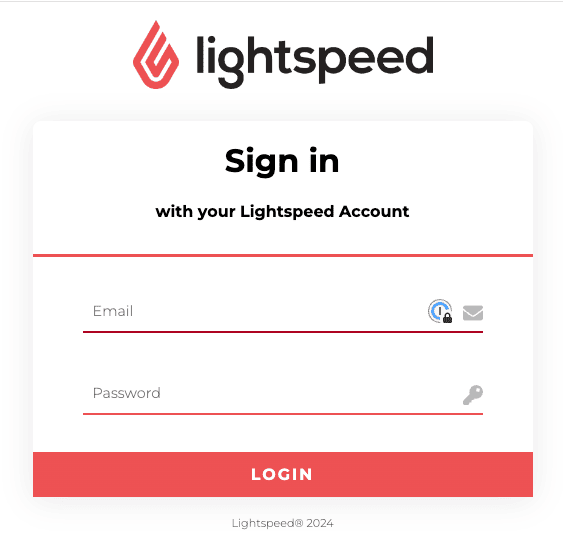
**Step 1:** Enter your credentials to authenticate your account and establish the authentification .
<img src="https://mintcdn.com/chift/ZesGAZ6_2X6KlqGn/images/help/lightspeed/lightspeed-3.png?fit=max&auto=format&n=ZesGAZ6_2X6KlqGn&q=85&s=103d75ad28c383cb048049ac53050a98" alt="" width="563" height="550" data-path="images/help/lightspeed/lightspeed-3.png" />

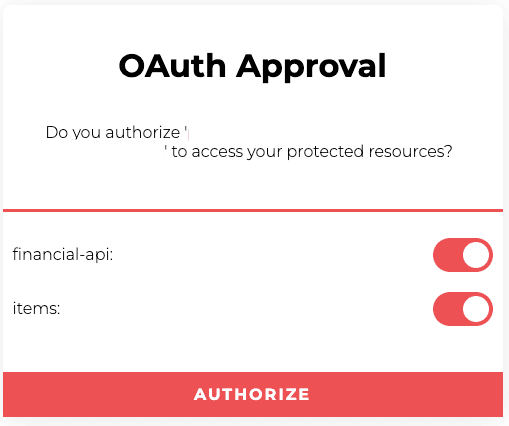
**Step 2:** Authorise the data exchange to finalise the connection.
<img src="https://mintcdn.com/chift/ZesGAZ6_2X6KlqGn/images/help/lightspeed/lightspeed-4.png?fit=max&auto=format&n=ZesGAZ6_2X6KlqGn&q=85&s=42bbdbd19fca34f15cbd0d3594574041" alt="" width="509" height="426" data-path="images/help/lightspeed/lightspeed-4.png" />
