> ## Documentation Index
> Fetch the complete documentation index at: https://docs.chift.eu/llms.txt
> Use this file to discover all available pages before exploring further.

# Fastmag

# Prerequisites

Please take contact with your sales representative to have access to the API.

There is an additional cost to be able to use the API.

They will as well provide you with the credentials to activate the connection.

# CONNEXION

**Step 1:** Choose a name for your connection (optional)

<img src="https://mintcdn.com/chift/U3w_2-2HA3dqCvqF/images/help/fastmag/fastmag-1.png?fit=max&auto=format&n=U3w_2-2HA3dqCvqF&q=85&s=41e443662ec5d86e456b7b87ff76f085" alt="" width="592" height="110" data-path="images/help/fastmag/fastmag-1.png" />

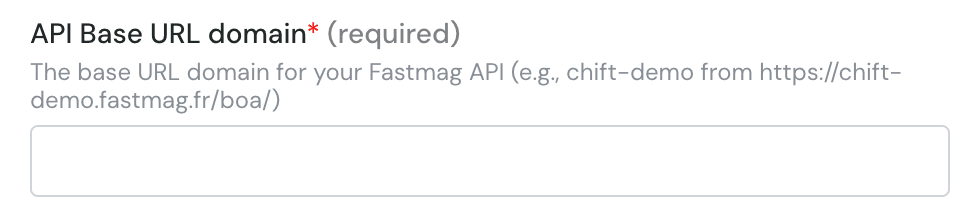
**Step 2:** Enter base URL domain for your Fastmag API
<img src="https://mintcdn.com/chift/U3w_2-2HA3dqCvqF/images/help/fastmag/fastmag-2.png?fit=max&auto=format&n=U3w_2-2HA3dqCvqF&q=85&s=13907b24c8002d481a0d4dcca41f2d41" alt="image.png" width="970" height="214" data-path="images/help/fastmag/fastmag-2.png" />

**Step 3**: Enter the store name

<img src="https://mintcdn.com/chift/U3w_2-2HA3dqCvqF/images/help/fastmag/fastmag-3.png?fit=max&auto=format&n=U3w_2-2HA3dqCvqF&q=85&s=4402ac16a32c2149daf90779991ca130" alt="image.png" width="964" height="186" data-path="images/help/fastmag/fastmag-3.png" />

**Step 4**: Enter the database name

<img src="https://mintcdn.com/chift/U3w_2-2HA3dqCvqF/images/help/fastmag/fastmag-4.png?fit=max&auto=format&n=U3w_2-2HA3dqCvqF&q=85&s=0bc54ca7c91c83fa7f2c566c9ca27154" alt="image.png" width="942" height="182" data-path="images/help/fastmag/fastmag-4.png" />

**Step 5**: Enter the application source

<img src="https://mintcdn.com/chift/U3w_2-2HA3dqCvqF/images/help/fastmag/fastmag-5.png?fit=max&auto=format&n=U3w_2-2HA3dqCvqF&q=85&s=f636598c88af80459705a5111d713ff9" alt="image.png" width="966" height="190" data-path="images/help/fastmag/fastmag-5.png" />

**Step 6**: Enter the username

<img src="https://mintcdn.com/chift/U3w_2-2HA3dqCvqF/images/help/fastmag/fastmag-6.png?fit=max&auto=format&n=U3w_2-2HA3dqCvqF&q=85&s=774428e25f9d877abc4cbcf9472ed732" alt="image.png" width="954" height="144" data-path="images/help/fastmag/fastmag-6.png" />

**Step 7:** Enter the password

<img src="https://mintcdn.com/chift/U3w_2-2HA3dqCvqF/images/help/fastmag/fastmag-7.png?fit=max&auto=format&n=U3w_2-2HA3dqCvqF&q=85&s=c756c5452a1a73b1c76508c684023316" alt="image.png" width="944" height="144" data-path="images/help/fastmag/fastmag-7.png" />

**Step 8:** Click "Connect" to finalise the connection.

<img src="https://mintcdn.com/chift/U3w_2-2HA3dqCvqF/images/help/fastmag/fastmag-8.png?fit=max&auto=format&n=U3w_2-2HA3dqCvqF&q=85&s=1cc5ddbdf1f414efd2704842b283f6b3" alt="" width="184" height="79" data-path="images/help/fastmag/fastmag-8.png" />


