> ## Documentation Index
> Fetch the complete documentation index at: https://docs.chift.eu/llms.txt
> Use this file to discover all available pages before exploring further.
# BoondManager
# Prerequisites
You need to make sure that something called "Basic Auth" is enabled on your account. To do so, go into your Boondmanager account, open the configuration section and go to the Intranet Tab.
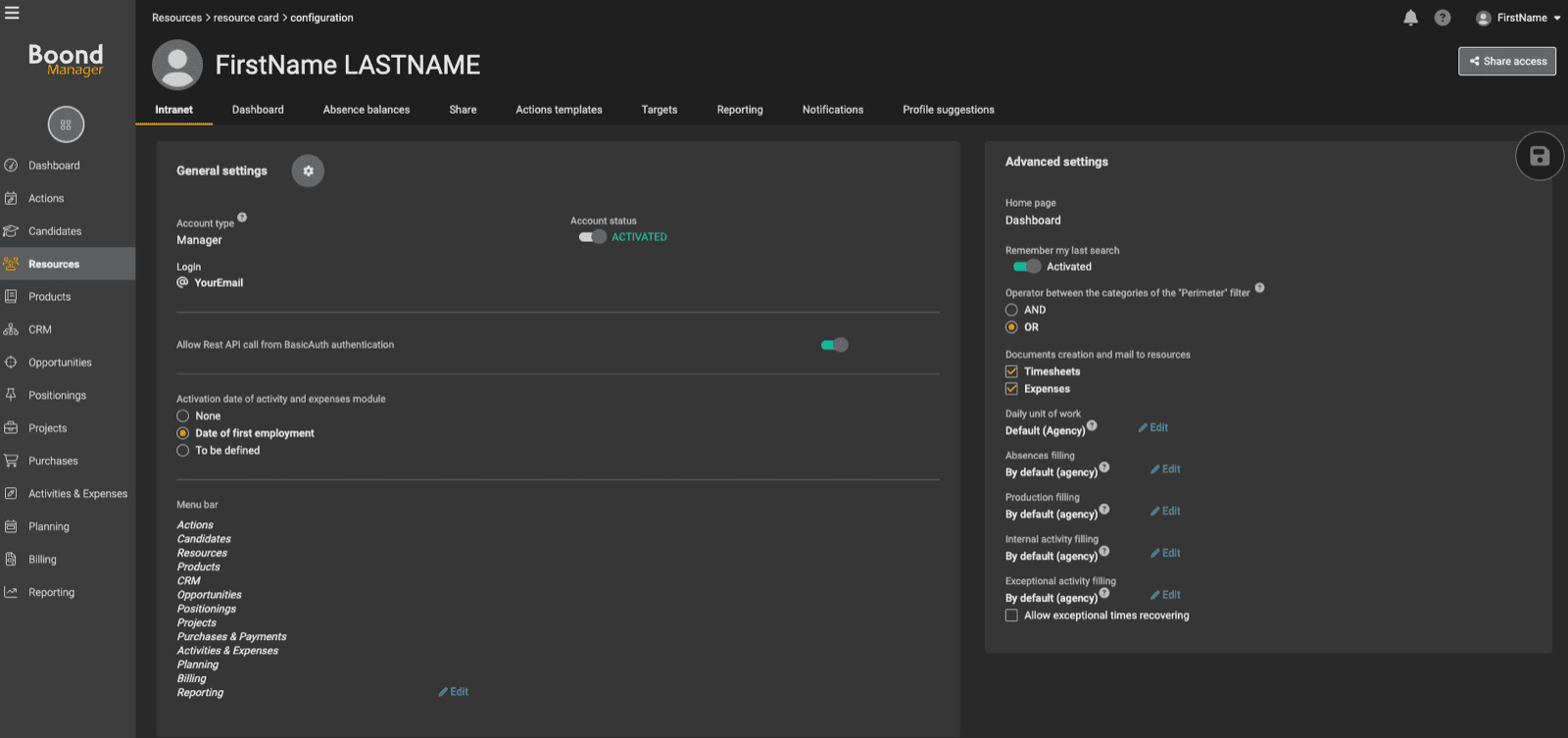 You will find a section related to Basic Auth in this section (as you can see on the above screenshot). Make sure that this is enabled.
Once the Basic Auth is enabled, you can proceed with the connection of your BoonManager account 🙌
# CONNEXION
**Step 1:** Choose a name for your connection.
You will find a section related to Basic Auth in this section (as you can see on the above screenshot). Make sure that this is enabled.
Once the Basic Auth is enabled, you can proceed with the connection of your BoonManager account 🙌
# CONNEXION
**Step 1:** Choose a name for your connection.
 **Step 2:** Enter your BoondManager account email.
 **Step 3:** Enter your BoondManager account password.
 **Step 4:** Click "Connect" to finalise the connection