> ## Documentation Index
> Fetch the complete documentation index at: https://docs.chift.eu/llms.txt
> Use this file to discover all available pages before exploring further.
# eBay
> How to connect your eBay account: what you need, how to prepare it, and how to connect.
# 🚨 Prerequisites
Before you start, make sure you have:
* an eBay seller account that receives payouts through eBay's payments
* the sign-in of the eBay account that receives the payouts: eBay does not share financial data with team members
# ⚡️ Connection
If the form asks for one, choose a name you will recognise later.
 Pick the eBay site you sell on, for example **France** or **Germany**.
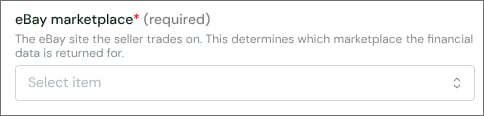 You are redirected to eBay.
 # ✅ Authentication
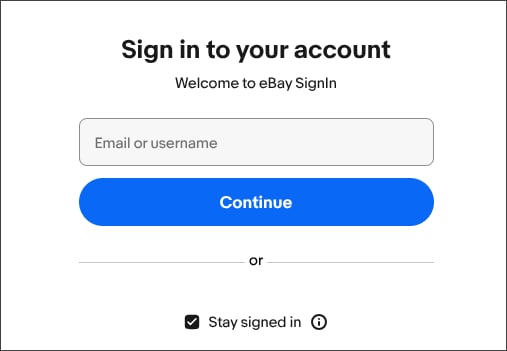
Sign in to eBay with the account that receives your payouts.
# ✅ Authentication
Sign in to eBay with the account that receives your payouts.
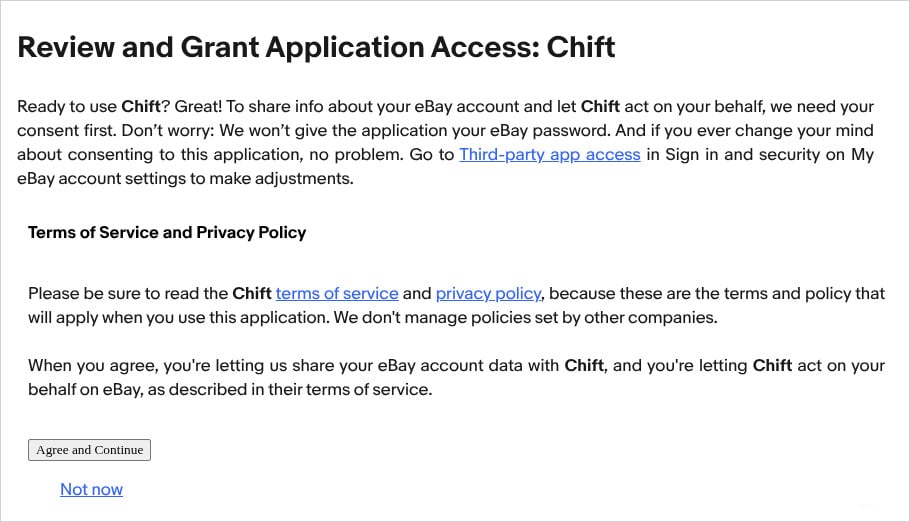
 eBay then shows the **Review and Grant Application Access** page, with the access requested. Click **Agree and Continue**.
 Once you agree, you return to the connection window and the connection is active. If you are already signed in to eBay and granted this access before, eBay skips these screens and takes you straight back.
# ❓ Troubleshooting
You signed in with an eBay user that is not the account receiving the payouts, for example a team member. eBay never shares financial data with team members.
Connect again and sign in with the eBay account that receives the payouts.
eBay no longer accepts the connection's access, for example after a password change or a revoked authorization.
Connect again and sign in to eBay to renew the access.
This documentation is built and hosted on [Mintlify](https://mintlify.com), a developer documentation platform.
Once you agree, you return to the connection window and the connection is active. If you are already signed in to eBay and granted this access before, eBay skips these screens and takes you straight back.
# ❓ Troubleshooting
You signed in with an eBay user that is not the account receiving the payouts, for example a team member. eBay never shares financial data with team members.
Connect again and sign in with the eBay account that receives the payouts.
eBay no longer accepts the connection's access, for example after a password change or a revoked authorization.
Connect again and sign in to eBay to renew the access.
This documentation is built and hosted on [Mintlify](https://mintlify.com), a developer documentation platform.