> ## Documentation Index
> Fetch the complete documentation index at: https://docs.chift.eu/llms.txt
> Use this file to discover all available pages before exploring further.
# Minox
# CONNEXION
**Étape 1:** Choisissez un nom pour votre connexion.
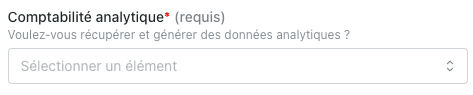
 **Étape 2:** Souhaitez-vous récupérer les données analytiques.
Si oui, alors sélectionnez le champ "actif", sinon comptabilité analytique = "inactif".
**Étape 2:** Souhaitez-vous récupérer les données analytiques.
Si oui, alors sélectionnez le champ "actif", sinon comptabilité analytique = "inactif".
 **Étape 3:** Cliquez sur "Autoriser" pour finaliser la connexion.
 # CONFIGURATION
**Étape 1:** Sélectionnez le dossier comptable à activer.
# CONFIGURATION
**Étape 1:** Sélectionnez le dossier comptable à activer.
 **Étape 2:** Cliquez sur "Valider" pour finaliser la configuration.