> ## Documentation Index
> Fetch the complete documentation index at: https://docs.chift.eu/llms.txt
> Use this file to discover all available pages before exploring further.
# Building with Syncs
In the Sync model, **Chift builds the integration and triggers the flows**. Rather than calling connector data yourself, you delegate the synchronisation to Chift: we define it with you and run it on an event or a schedule, with no integration code on your side.
New to the terms *connector*, *consumer*, and *connection*? See [How it works](/developer-guides/how-it-works) first.
 ## How a sync works
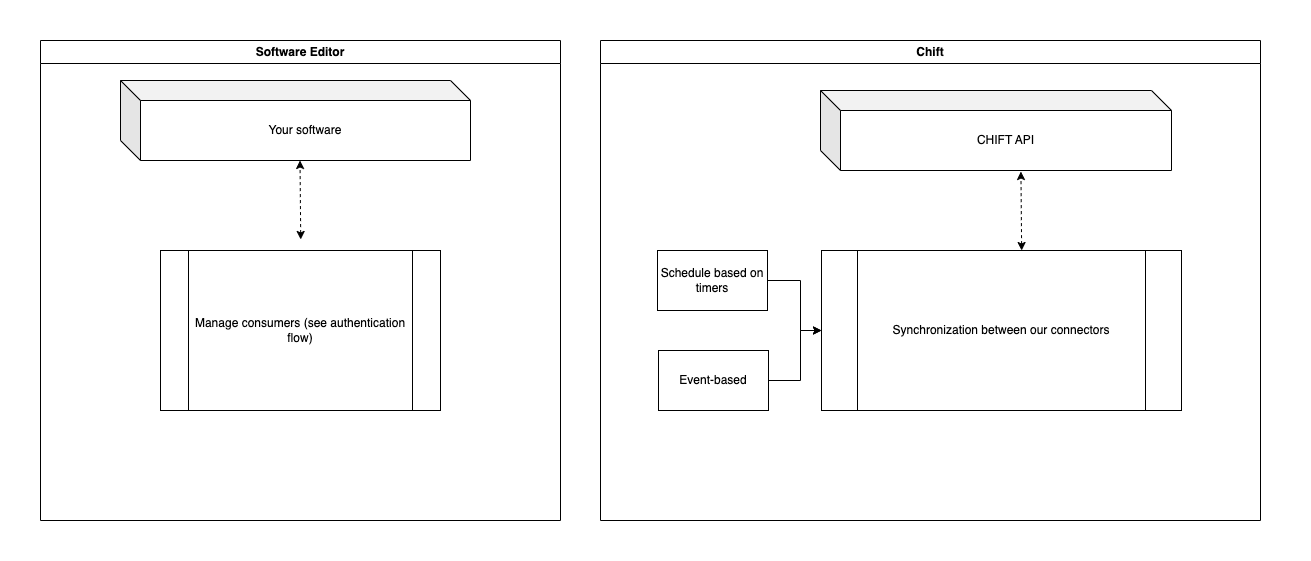
A **sync** is a synchronisation between two of Chift's APIs, built and maintained by Chift. It contains one or more **flows**, each triggered by an event or a timer (for example, every night at 4 AM), running a process — such as *get invoices and inject them into accounting* — for every consumer linked to the sync.
During onboarding you can add **mappings**, correspondences your end-user confirms — for example matching tax rates between their POS and their accounting software.
## What stays the same
You still create consumers and connections exactly as in the [Unified API model](/developer-guides/unified-api/overview) — a sync runs on top of those connections. What you don't write is the integration logic that moves the data; Chift owns that.
## Learn more
The Syncs product documentation covers the full picture — building, exposing to end-users, and the ready-to-use syncs:
Requirements, how we build a sync with you, and the dedicated endpoints.
The full Syncs section, including ready-to-use syncs.
Syncs are set up together with the Chift team. [Contact us](https://www.chift.eu/contact) to scope one for your use case.
## How a sync works
A **sync** is a synchronisation between two of Chift's APIs, built and maintained by Chift. It contains one or more **flows**, each triggered by an event or a timer (for example, every night at 4 AM), running a process — such as *get invoices and inject them into accounting* — for every consumer linked to the sync.
During onboarding you can add **mappings**, correspondences your end-user confirms — for example matching tax rates between their POS and their accounting software.
## What stays the same
You still create consumers and connections exactly as in the [Unified API model](/developer-guides/unified-api/overview) — a sync runs on top of those connections. What you don't write is the integration logic that moves the data; Chift owns that.
## Learn more
The Syncs product documentation covers the full picture — building, exposing to end-users, and the ready-to-use syncs:
Requirements, how we build a sync with you, and the dedicated endpoints.
The full Syncs section, including ready-to-use syncs.
Syncs are set up together with the Chift team. [Contact us](https://www.chift.eu/contact) to scope one for your use case.