> ## Documentation Index
> Fetch the complete documentation index at: https://docs.chift.eu/llms.txt
> Use this file to discover all available pages before exploring further.
# Data layer overview
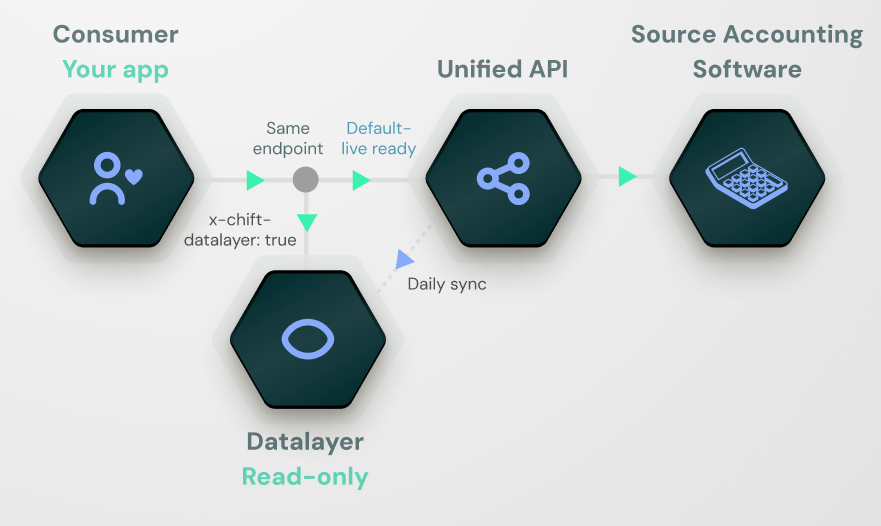
The **data layer** is an alternative way to read unified data through Chift. Instead of querying the source accounting system live on every request — the way the unified API normally works — your reads are served from a copy of the data that Chift maintains on its own infrastructure and keeps in sync with the source in the background.
This is the perfect solution for reporting use cases or for AI agents to compute a lot of data and context.
The API surface is exactly the same. You keep calling the same unified endpoints with the same parameters and get the same response shape. What changes is *where* the answer comes from, and you choose that **per request** by setting a header.
 ## How it differs from the unified API
By default, every call you make to a Chift unified endpoint is **transactional**: Chift forwards the request to the third-party system in real time, normalizes the response, and returns it.
When you send the request with the `x-chift-datalayer: true` header, the same call is served from Chift's data layer store, which a background sync keeps up to date. The sync contacts the source system, not the request itself.
| | Unified API (default) | Data layer (`x-chift-datalayer: true`) |
| --------------------------------------- | ------------------------------------- | ------------------------------------------------------------- |
| Where reads come from | Source unified system, live | Chift's data layer store |
| Freshness | Always the latest state of the source | As fresh as the last sync |
| Response time | Depends on the source system | Fast and consistent |
| Heavy queries / pagination over history | Limited by the source | Designed for it |
| Writes (create / update) | Go straight to the source | Still go straight to the source — the data layer is read-only |
| API surface used | Same unified endpoints | Same unified endpoints |
| Opt-in level | Default | Per request, via header |
Because the choice is made per request, the same connection can serve both live and data layer reads side by side. If you need a record back the instant you've written it, simply omit the header on that read; if you're paginating through history, send it.
## When to use the data layer
The data layer is the right choice when you want:
* **Fast, consistent read latency** that doesn't depend on the load or availability of the source accounting system.
* **To page through large amounts of historical data** (entries, invoices, partners) without hitting the source on every page.
* **To run heavier read patterns** — filtering, date ranges, multiple folders — at a higher rate than the source would comfortably allow.
* **To decouple your read traffic** from the source system's rate limits and downtime.
The default unified API remains the right choice when freshness matters above all (status checks, write-then-read flows, real-time UIs), when traffic is modest, or when the data you need isn't yet covered by the data layer.
## What's covered today
The data layer covers the **Accounting**, **Point of Sale** and **Banking** unified APIs. Within each, the standard resources are available:
**Accounting**
* Folders
* Chart of accounts (ledger accounts)
* Journals
* Journal entries (and lines)
* Invoices (and lines, payments)
* Partners (clients and suppliers)
* VAT codes
* Book years
* Analytic plans
**Point of Sale**
* Locations
* Customers
* Products, product categories and accounting categories
* Taxes
* Payment methods
* Orders (and lines, payments)
**Banking**
* Financial institutions
* Financial accounts
* Transactions
You pick which of these resources actually sync per vertical on the settings page — see [Activating the data layer](/developer-guides/datalayer/activation).
## How freshness works
The data layer is populated by a **sync** attached to the connection. The sync runs on a defined cadence and writes the records it pulls into the data layer store. How much it pulls on each run depends on the kind of entity:
* **Time-series entities — accounting journal entries and invoices, POS orders, banking transactions — are synced incrementally.** Each run pulls only the records created or changed in the source since the previous run, plus a configurable **lookback window** that re-pulls recent history to catch late edits and backdated changes. This keeps each run fast even as history grows.
* **Reference data — folders, locations, chart of accounts, journals, partners, product catalogs, VAT codes, book years, financial institutions and accounts — is fully re-synced.** These sets are small and change rarely, so every run refreshes them in full rather than tracking deltas.
A few things to know:
* **Reads with the header always reflect the last successful sync.** If the source has changed since the last sync ran, those changes are not yet visible through the data layer.
* **Reads without the header are always live**, so a write-then-read flow that needs the freshest state simply skips the header on the read.
* **The sync cadence is configurable per connection** and is agreed with your CSM/SE when the feature is enabled — see [Activating the data layer](/developer-guides/datalayer/activation).
### Refresh webhooks
You can subscribe to webhooks to know exactly when a data layer refresh runs, so you can react when fresh data becomes available (for example, kick off downstream reporting jobs once a refresh completes). Two events are emitted, **once per consumer**, around each refresh:
* `account.datalayer.refresh_initiated` — sent when a refresh starts for a consumer.
* `account.datalayer.refresh_executed` — sent when the refresh finishes for that consumer, with a `status` of `success` or `error` indicating how it ended.
Both carry the standard webhook attributes (`accountid`, `consumerid`, `created`, ...) plus the `connectionid` of the connection being refreshed, the `api` the sync refreshes (e.g. `Accounting`), and a `scope` describing the part of the source the refresh covers (the `scope` shape depends on the API). See [Webhooks](/developer-guides/webhooks) for the full payload format and how to verify the signature.
### Reconnecting to a different account
A connection keeps the same id even if its credentials are later re-entered to point at a **different** source account. When the sync detects that the connected account has changed — a genuine swap, not a routine re-authentication of the same account — it **wipes the connection's data layer store and rebuilds it from scratch** on that run, so data from two different accounts is never mixed.
If you mirror the data layer into your own store, treat this like any other refresh: the run emits the usual `account.datalayer.data_deleted` and `data_changed` events, and a periodic full fetch reconciles anything you might have missed (see [Fetching data](/developer-guides/datalayer/fetching-data)). Re-authenticating the **same** account leaves the store untouched.
## Security and isolation
The data layer is multi-tenant by construction. Every record stored on Chift's side carries the identifiers of the customer it belongs to — the consumer, the connection and, for accounting, the folder.
Chift plans to offer a hybrid architecture for this use case in the future.
Next: [Activating the data layer](/developer-guides/datalayer/activation) walks through how to enable it on a connection and how to use the header in your requests.
## How it differs from the unified API
By default, every call you make to a Chift unified endpoint is **transactional**: Chift forwards the request to the third-party system in real time, normalizes the response, and returns it.
When you send the request with the `x-chift-datalayer: true` header, the same call is served from Chift's data layer store, which a background sync keeps up to date. The sync contacts the source system, not the request itself.
| | Unified API (default) | Data layer (`x-chift-datalayer: true`) |
| --------------------------------------- | ------------------------------------- | ------------------------------------------------------------- |
| Where reads come from | Source unified system, live | Chift's data layer store |
| Freshness | Always the latest state of the source | As fresh as the last sync |
| Response time | Depends on the source system | Fast and consistent |
| Heavy queries / pagination over history | Limited by the source | Designed for it |
| Writes (create / update) | Go straight to the source | Still go straight to the source — the data layer is read-only |
| API surface used | Same unified endpoints | Same unified endpoints |
| Opt-in level | Default | Per request, via header |
Because the choice is made per request, the same connection can serve both live and data layer reads side by side. If you need a record back the instant you've written it, simply omit the header on that read; if you're paginating through history, send it.
## When to use the data layer
The data layer is the right choice when you want:
* **Fast, consistent read latency** that doesn't depend on the load or availability of the source accounting system.
* **To page through large amounts of historical data** (entries, invoices, partners) without hitting the source on every page.
* **To run heavier read patterns** — filtering, date ranges, multiple folders — at a higher rate than the source would comfortably allow.
* **To decouple your read traffic** from the source system's rate limits and downtime.
The default unified API remains the right choice when freshness matters above all (status checks, write-then-read flows, real-time UIs), when traffic is modest, or when the data you need isn't yet covered by the data layer.
## What's covered today
The data layer covers the **Accounting**, **Point of Sale** and **Banking** unified APIs. Within each, the standard resources are available:
**Accounting**
* Folders
* Chart of accounts (ledger accounts)
* Journals
* Journal entries (and lines)
* Invoices (and lines, payments)
* Partners (clients and suppliers)
* VAT codes
* Book years
* Analytic plans
**Point of Sale**
* Locations
* Customers
* Products, product categories and accounting categories
* Taxes
* Payment methods
* Orders (and lines, payments)
**Banking**
* Financial institutions
* Financial accounts
* Transactions
You pick which of these resources actually sync per vertical on the settings page — see [Activating the data layer](/developer-guides/datalayer/activation).
## How freshness works
The data layer is populated by a **sync** attached to the connection. The sync runs on a defined cadence and writes the records it pulls into the data layer store. How much it pulls on each run depends on the kind of entity:
* **Time-series entities — accounting journal entries and invoices, POS orders, banking transactions — are synced incrementally.** Each run pulls only the records created or changed in the source since the previous run, plus a configurable **lookback window** that re-pulls recent history to catch late edits and backdated changes. This keeps each run fast even as history grows.
* **Reference data — folders, locations, chart of accounts, journals, partners, product catalogs, VAT codes, book years, financial institutions and accounts — is fully re-synced.** These sets are small and change rarely, so every run refreshes them in full rather than tracking deltas.
A few things to know:
* **Reads with the header always reflect the last successful sync.** If the source has changed since the last sync ran, those changes are not yet visible through the data layer.
* **Reads without the header are always live**, so a write-then-read flow that needs the freshest state simply skips the header on the read.
* **The sync cadence is configurable per connection** and is agreed with your CSM/SE when the feature is enabled — see [Activating the data layer](/developer-guides/datalayer/activation).
### Refresh webhooks
You can subscribe to webhooks to know exactly when a data layer refresh runs, so you can react when fresh data becomes available (for example, kick off downstream reporting jobs once a refresh completes). Two events are emitted, **once per consumer**, around each refresh:
* `account.datalayer.refresh_initiated` — sent when a refresh starts for a consumer.
* `account.datalayer.refresh_executed` — sent when the refresh finishes for that consumer, with a `status` of `success` or `error` indicating how it ended.
Both carry the standard webhook attributes (`accountid`, `consumerid`, `created`, ...) plus the `connectionid` of the connection being refreshed, the `api` the sync refreshes (e.g. `Accounting`), and a `scope` describing the part of the source the refresh covers (the `scope` shape depends on the API). See [Webhooks](/developer-guides/webhooks) for the full payload format and how to verify the signature.
### Reconnecting to a different account
A connection keeps the same id even if its credentials are later re-entered to point at a **different** source account. When the sync detects that the connected account has changed — a genuine swap, not a routine re-authentication of the same account — it **wipes the connection's data layer store and rebuilds it from scratch** on that run, so data from two different accounts is never mixed.
If you mirror the data layer into your own store, treat this like any other refresh: the run emits the usual `account.datalayer.data_deleted` and `data_changed` events, and a periodic full fetch reconciles anything you might have missed (see [Fetching data](/developer-guides/datalayer/fetching-data)). Re-authenticating the **same** account leaves the store untouched.
## Security and isolation
The data layer is multi-tenant by construction. Every record stored on Chift's side carries the identifiers of the customer it belongs to — the consumer, the connection and, for accounting, the folder.
Chift plans to offer a hybrid architecture for this use case in the future.
Next: [Activating the data layer](/developer-guides/datalayer/activation) walks through how to enable it on a connection and how to use the header in your requests.