> ## Documentation Index
> Fetch the complete documentation index at: https://docs.chift.eu/llms.txt
> Use this file to discover all available pages before exploring further.
# Supporting Spanish Withholding Taxes (Retenciones / IRPF) in Chift
In Spain, certain invoices are subject to **withholding taxes**, known as ***retenciones***.
A withholding tax is a mechanism where the customer withholds part of the invoice amount and pays it directly to the Spanish tax authorities, instead of paying it to the supplier. As a result, the supplier receives a **net amount**, reduced by the withholding.
In practice, Spanish withholding taxes mainly apply under two legal frameworks:
* **IRPF (Impuesto sobre la Renta de las Personas Físicas)**\
This is the most common case and applies to **self-employed professionals and freelancers**.\
The legal name is ***Retención a cuenta del IRPF***.
* **Impuesto sobre Sociedades (Corporate Income Tax)**\
In some cases, withholding taxes also apply to **companies**.\
The legal name is ***Retención a cuenta del Impuesto sobre Sociedades***.
Unlike VAT, withholding taxes are **not line-level taxes**, do not increase the invoice total, and must be handled separately at the accounting and API level. This structural difference is why they require dedicated modeling when booking invoices in accounting systems.
**Why this matters**\
Spanish withholding taxes are **not optional edge cases**. They are a structural part of invoicing in Spain.
By introducing:
* A dedicated `withholding_tax` model
* Clear validation rules
* Explicit tax code separation
Chift ensures:
* Accurate accounting
* Consistent connector behavior
* No hidden connector-specific hacks
If you’re integrating Spanish invoices, this model is the only correct way to handle *retenciones*.
### Key accounting impact of withholding taxes
Withholding tax:
* is calculated at the **invoice header level**, not per line
* Reduces the **total payable amount**
* Does **not appear as VAT on invoice lines**
* Must be reported separately using specific tax codes
Because of this, modeling it as a “classic VAT tax line” leads to incorrect totals and broken accounting logic.
## How withholding taxes are handled in Chift
To properly support Spanish withholding taxes, Chift has a dedicated and explicit model.
### 1. `withholding_tax` attribute on invoices
A `withholding_tax` object is available **in both input and output**, located at the [**invoice header level (see here its definition)**](https://docs.chift.eu/api-reference/endpoints/accounting/create-salepurchase-entry-multiple-plans#body-withholding-tax-one-of-0).
This object is mandatory when a withholding applies and contains **three required attributes**:
* `tax_rate` – the withholding rate to apply (expressed as a negative value in standard usage)
* `tax_code` – a withholding-specific tax code (see section 3 of this article for more details)
* `tax_amount` – the calculated withholding amount (expressed as a negative value in standard usage)
### 2. Impact on invoice totals and validation
Withholding taxes directly affect invoice totals. Chift enforces strict validation rules to ensure accounting accuracy.
#### Invoice total validation
When submitting an invoice, Chift validates that:
```
Total invoice amount
= Sum of line totals
+ Withholding tax amount (negative)
```
* The withholding tax **reduces the total payable amount**.
* If this rule is not met, the API **returns a validation error**.
#### Header `tax_amount` calculation
The `tax_amount` at the invoice header level is computed as:
```
Header tax_amount
= Sum of line-level tax_amounts
+ Withholding tax amount (negative)
```
This guarantees that:
* VAT reporting remains accurate
* Withholding tax is clearly separated from line-level taxes
* Invoice totals match Spanish accounting expectations
### 3. Dedicated VAT codes for withholding taxes
To avoid ambiguity and invalid bookings, withholding tax codes are explicitly marked.
**Key points:**
* Specific attribute: `withholding_tax` on VAT codes (`true` or `false`)
* Marks a tax code as **withholding-specific**
**Chift validation rules:**
* **Withholding tax VAT codes cannot be used on invoice lines**
* Only withholding tax VAT codes can be used in the `withholding_tax` **attribute**
* Standard VAT codes remain line-level only
This separation prevents:
* Mixing VAT and withholding logic
* Incorrect tax reporting
* Connector-specific inconsistencies
## Booking an invoice with withholding tax via Chift
To correctly book a Spanish invoice with withholding tax:
1. **Use standard VAT codes on invoice lines**
* Lines behave exactly like any regular VAT invoice
2. **Declare the withholding at header level**
* Populate the `withholding_tax` object with:
* The correct Spanish withholding tax code
* Rate and calculated amount (negative)
3. Adjust `tax_amount` and `total` **at the invoice header**
* Amounts must respect the validation rules described above
This approach matches how Spanish accounting software and ERPs model *retenciones*, while keeping a clean and predictable Unified API.
Business Central does not natively support withholding taxes as a dedicated accounting concept.\
As a result, withholding taxes are implemented using a specific VAT configuration and accounting mapping.\
The rules below describe how this is modeled in Business Central and exposed through Chift.
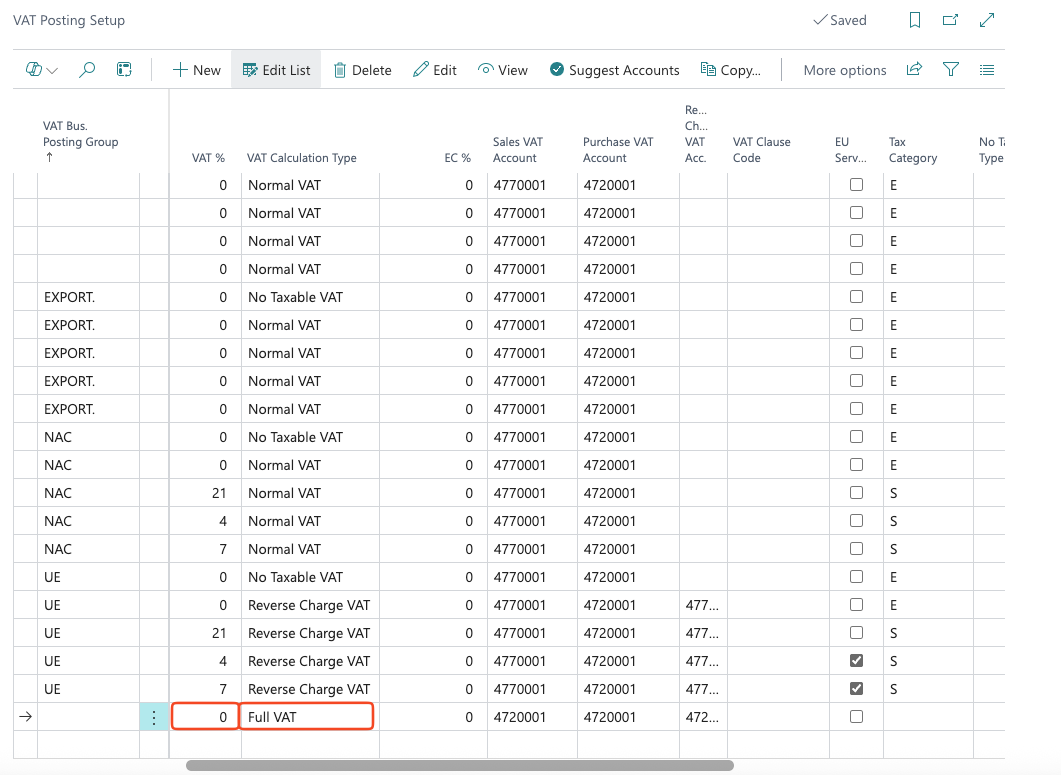
* VAT codes with a tax rate of **0** and a calculation type set to **Full VAT** are treated as withholding tax codes.\
These VAT codes are exposed via the API with `withholding_tax = true`.
\
*To add, or edit Withholding taxes you need to go to "VAT posting setup" page (use the search icon). See example here👇*
 * VAT codes flagged as withholding:
* **cannot be used on standard invoice lines**
* Can only be used in the `withholding_tax` attribute at invoice header level and are the **only** taxes accepted at header level.
* On **customer invoices and refunds**, the **Sales VAT Account** defined on the VAT code is used as the general ledger account for the withholding tax.
* On **supplier invoices and refunds**, the **Purchase VAT Account** defined on the VAT code is used instead.
* For calculation purposes, Business Central relies on internal invoice lines linked to these VAT codes.\
These lines:
* are used to compute the `withholding_tax` object returned by the API
* are **not included** in the `lines` array of the invoice response
This approach allows withholding taxes to be correctly posted in Business Central while preserving a clean and explicit withholding tax model in the Unified API.\
\
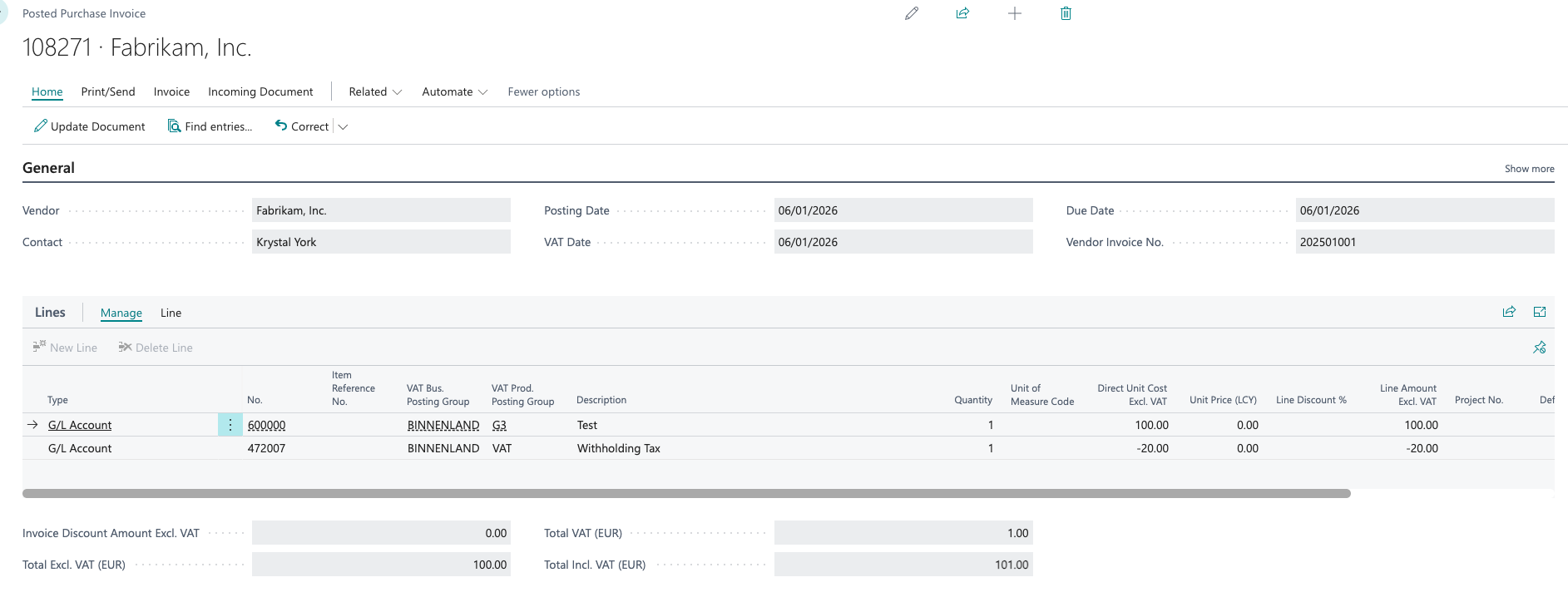
*Example of an invoice booked with Withholding tax in Business central 👇*
* VAT codes flagged as withholding:
* **cannot be used on standard invoice lines**
* Can only be used in the `withholding_tax` attribute at invoice header level and are the **only** taxes accepted at header level.
* On **customer invoices and refunds**, the **Sales VAT Account** defined on the VAT code is used as the general ledger account for the withholding tax.
* On **supplier invoices and refunds**, the **Purchase VAT Account** defined on the VAT code is used instead.
* For calculation purposes, Business Central relies on internal invoice lines linked to these VAT codes.\
These lines:
* are used to compute the `withholding_tax` object returned by the API
* are **not included** in the `lines` array of the invoice response
This approach allows withholding taxes to be correctly posted in Business Central while preserving a clean and explicit withholding tax model in the Unified API.\
\
*Example of an invoice booked with Withholding tax in Business central 👇*