> ## Documentation Index
> Fetch the complete documentation index at: https://docs.chift.eu/llms.txt
> Use this file to discover all available pages before exploring further.

# Sage 100 Comptabilité

export const OverviewLegend = ({showTitle = true}) => <blockquote>
    {showTitle && <p>
        <strong>Overview legend 🧭</strong>
      </p>}
    <table>
      <thead>
        <tr>
          <th>Column</th>
          <th>Value</th>
          <th>Meaning</th>
        </tr>
      </thead>
      <tbody>
        <tr>
          <td>Geography</td>
          <td>🇫🇷 FR · 🇧🇪 BE · …</td>
          <td>Countries where the connector is officially supported.</td>
        </tr>
        <tr>
          <td rowSpan={3}>Software type</td>
          <td>SaaS</td>
          <td>Through API.</td>
        </tr>
        <tr>
          <td>On-premise (local agent)</td>
          <td>
            Software running locally — installation of a local agent is
            required.
          </td>
        </tr>
        <tr>
          <td>On-premise (API)</td>
          <td>Software running locally — API available.</td>
        </tr>
        <tr>
          <td rowSpan={2}>Status</td>
          <td>🔵 Live</td>
          <td>Connector is generally available and production-ready.</td>
        </tr>
        <tr>
          <td>🟣 Beta</td>
          <td>
            Connector is in beta — usable in production but may still evolve.
          </td>
        </tr>
        <tr>
          <td>Multi folder</td>
          <td>✅ Yes / ❌ No</td>
          <td>
            Connection to multiple accounting folders at the same time (see{' '}
            <a href="/developer-guides/api-guides/accounting/folders">
              accounting folders guide
            </a>
            ).
          </td>
        </tr>
        <tr>
          <td>Rate limits</td>
          <td>✅ No / ❌ Yes</td>
          <td>Whether the target software sets rate limits on API calls.</td>
        </tr>
        <tr>
          <td rowSpan={3}>API keys</td>
          <td>❎ No</td>
          <td>
            No API keys required (OAuth2 client secret and client ID). No
            requirements to activate the connector — you can create a
            connection.
          </td>
        </tr>
        <tr>
          <td>🔑</td>
          <td>
            Keys are required to activate the connector. Chift cannot act as
            intermediary to obtain them; we can still assist with steps to get
            keys directly from the software provider.
          </td>
        </tr>
        <tr>
          <td>🔑 ☑️ via Chift</td>
          <td>
            Keys are required to activate the connector. You can go through
            Chift to get the keys (intermediary or partnership keys). An
            approval process may still apply, but you do not need to request
            keys from the vendor on your own.
          </td>
        </tr>
        <tr>
          <td rowSpan={3}>Approval / certification process</td>
          <td>⚡ Instant</td>
          <td>
            No keys required, or Chift can encode their keys for you when
            requested. Activation is instantaneous.
          </td>
        </tr>
        <tr>
          <td>🟢 Approval — [Duration]</td>
          <td>
            Approval will be granted. The vendor may require information or app
            configuration in a developer portal before issuing keys.
          </td>
        </tr>
        <tr>
          <td>🟠 Approval — [Duration]</td>
          <td>
            Approval is not guaranteed — often due to integration strategy; the
            vendor may do a deeper assessment (competitors, partnership
            requirements, and similar).
          </td>
        </tr>
        <tr>
          <td rowSpan={2}>Activation time</td>
          <td>⚡ Instant</td>
          <td>
            If no keys are required, or Chift has keys ready to share with you.
          </td>
        </tr>
        <tr>
          <td>Time</td>
          <td>
            Estimated time to get the connector activated in production as a
            result of the approval or certification process (e.g. ⏱️ 2 days, 1
            week).
          </td>
        </tr>
        <tr>
          <td rowSpan={3}>Extra fees — software editor</td>
          <td>❎ No</td>
          <td>No fees charged by the software editor.</td>
        </tr>
        <tr>
          <td>💰 🕹️</td>
          <td>Fees associated with obtaining a testing account.</td>
        </tr>
        <tr>
          <td>💰 🔑</td>
          <td>Fees charged to get API keys.</td>
        </tr>
        <tr>
          <td rowSpan={2}>Extra fees — end user</td>
          <td>❎ No</td>
          <td>The end user does not pay extra to get integrated.</td>
        </tr>
        <tr>
          <td>💰 Yes</td>
          <td>The end user must pay extra to get integrated.</td>
        </tr>
        <tr>
          <td>Comments on costs</td>
          <td>—</td>
          <td>Additional notes on fees or pricing when relevant.</td>
        </tr>
        <tr>
          <td rowSpan={4}>Sandbox account</td>
          <td>✅ via Chift</td>
          <td>Chift can provide you with a sandbox.</td>
        </tr>
        <tr>
          <td>🟠 Only through integrator</td>
          <td>Only the software's integrator can provide a sandbox.</td>
        </tr>
        <tr>
          <td>✅ Self-service</td>
          <td>You can create your own sandbox.</td>
        </tr>
        <tr>
          <td>✅ Trial account</td>
          <td>It is possible to create a trial account.</td>
        </tr>
      </tbody>
    </table>
  </blockquote>;

export const ConnectorCardIframe = ({api = 'accounting', connectors}) => {
  const [theme, setTheme] = React.useState('light');
  React.useEffect(() => {
    const checkTheme = () => {
      const isDark = document.documentElement.classList.contains('dark');
      setTheme(isDark ? 'dark' : 'light');
    };
    checkTheme();
    const observer = new MutationObserver(checkTheme);
    observer.observe(document.documentElement, {
      attributes: true,
      attributeFilter: ['class']
    });
    return () => observer.disconnect();
  }, []);
  const queryParams = new URLSearchParams({
    api,
    theme,
    ...connectors ? {
      connectors
    } : {}
  });
  const iframeUrl = `https://chift-coverage-matrix.s3.eu-west-3.amazonaws.com/connector-card.html?${queryParams.toString()}`;
  return <iframe src={iframeUrl} title={`Chift connector information - ${api}`} style={{
    display: 'block',
    width: '100%',
    height: '480px',
    margin: 0,
    padding: 0,
    border: 'none'
  }} />;
};

export const CoverageIframe = ({api = 'accounting', connectors}) => {
  const [theme, setTheme] = React.useState('light');
  const [isFullscreen, setIsFullscreen] = React.useState(false);
  const [currentIframeUrl, setCurrentIframeUrl] = React.useState(null);
  const iframeRef = React.useRef(null);
  React.useEffect(() => {
    const checkTheme = () => {
      const isDark = document.documentElement.classList.contains('dark');
      setTheme(isDark ? 'dark' : 'light');
    };
    checkTheme();
    const observer = new MutationObserver(checkTheme);
    observer.observe(document.documentElement, {
      attributes: true,
      attributeFilter: ['class']
    });
    return () => observer.disconnect();
  }, []);
  React.useEffect(() => {
    const handleFullscreenChange = () => {
      setIsFullscreen(!!document.fullscreenElement);
    };
    document.addEventListener('fullscreenchange', handleFullscreenChange);
    return () => document.removeEventListener('fullscreenchange', handleFullscreenChange);
  }, []);
  React.useEffect(() => {
    const handleMessage = event => {
      if (!event.origin.includes('chift-coverage-matrix.s3.eu-west-3.amazonaws.com')) return;
      if (event.data?.type === 'urlChange' && event.data?.url) {
        setCurrentIframeUrl(event.data.url);
      }
    };
    window.addEventListener('message', handleMessage);
    return () => window.removeEventListener('message', handleMessage);
  }, []);
  const queryParams = new URLSearchParams({
    api,
    theme,
    ...connectors ? {
      connectors
    } : {}
  });
  const iframeUrl = `https://chift-coverage-matrix.s3.eu-west-3.amazonaws.com/coverage.html?${queryParams.toString()}`;
  const openUrl = currentIframeUrl || iframeUrl;
  const toggleFullscreen = () => {
    if (!document.fullscreenElement) {
      iframeRef.current?.requestFullscreen();
    } else {
      document.exitFullscreen();
    }
  };
  const isDark = theme === 'dark';
  const buttonStyle = {
    display: 'inline-flex',
    alignItems: 'center',
    gap: '8px',
    padding: '4px 12px',
    fontSize: '14px',
    fontWeight: '500',
    color: isDark ? '#d4d4d4' : '#374151',
    backgroundColor: 'transparent',
    border: `1px solid ${isDark ? '#404040' : '#e5e7eb'}`,
    borderRadius: '12px',
    cursor: 'pointer',
    textDecoration: 'none',
    transition: 'all 0.15s ease'
  };
  const hoverBg = isDark ? 'rgba(255,255,255,0.05)' : 'rgba(0,0,0,0.03)';
  const hoverBorder = isDark ? '#525252' : '#d1d5db';
  const defaultBg = 'transparent';
  const defaultBorder = isDark ? '#404040' : '#e5e7eb';
  return <>
  <div style={{
    display: 'flex',
    justifyContent: 'flex-end',
    gap: '12px',
    marginBottom: '8px'
  }}>
    <button onClick={toggleFullscreen} style={buttonStyle} onMouseEnter={e => {
    e.target.style.backgroundColor = hoverBg;
    e.target.style.borderColor = hoverBorder;
  }} onMouseLeave={e => {
    e.target.style.backgroundColor = defaultBg;
    e.target.style.borderColor = defaultBorder;
  }}>
      <svg width="16" height="16" viewBox="0 0 24 24" fill="none" stroke="currentColor" strokeWidth="2" strokeLinecap="round" strokeLinejoin="round">
        {isFullscreen ? <>
            <polyline points="4 14 10 14 10 20"></polyline>
            <polyline points="20 10 14 10 14 4"></polyline>
            <line x1="14" y1="10" x2="21" y2="3"></line>
            <line x1="3" y1="21" x2="10" y2="14"></line>
          </> : <>
            <polyline points="15 3 21 3 21 9"></polyline>
            <polyline points="9 21 3 21 3 15"></polyline>
            <line x1="21" y1="3" x2="14" y2="10"></line>
            <line x1="3" y1="21" x2="10" y2="14"></line>
          </>}
      </svg>
      {isFullscreen ? 'Exit Fullscreen' : 'Fullscreen'}
    </button>
    <a href={iframeUrl} target="_blank" rel="noopener noreferrer" style={buttonStyle} onMouseEnter={e => {
    e.target.style.backgroundColor = hoverBg;
    e.target.style.borderColor = hoverBorder;
  }} onMouseLeave={e => {
    e.target.style.backgroundColor = defaultBg;
    e.target.style.borderColor = defaultBorder;
  }}>
      <svg width="16" height="16" viewBox="0 0 24 24" fill="none" stroke="currentColor" strokeWidth="2" strokeLinecap="round" strokeLinejoin="round">
        <path d="M18 13v6a2 2 0 0 1-2 2H5a2 2 0 0 1-2-2V8a2 2 0 0 1 2-2h6"></path>
        <polyline points="15 3 21 3 21 9"></polyline>
        <line x1="10" y1="14" x2="21" y2="3"></line>
      </svg>
      Open in new tab
    </a>
  </div>
  <iframe ref={iframeRef} src={iframeUrl} title={`Chift Coverage Matrix - ${api}`} style={{
    height: 'max(500px, 80vh)'
  }} className="w-full" allowFullScreen />
  <blockquote>
    <p>
      <strong>Matrix Legend 🧭</strong>
    </p>
    <table>
      <thead>
        <tr>
          <th>Status</th>
          <th>Meaning</th>
        </tr>
      </thead>
      <tbody>
        <tr>
          <td>✅ Implemented</td>
          <td>Endpoint is implemented and available.</td>
        </tr>
        <tr>
          <td>❌ Not supported</td>
          <td>
            Endpoint is not supported by the target software (connector
            limitation). Cannot be implemented.
          </td>
        </tr>
        <tr>
          <td>💬 On request</td>
          <td>
            Endpoint is not implemented but feasibility is validated. Can be
            implemented on request — contact your Chift point of contact to
            discuss scope and timing.
          </td>
        </tr>
        <tr>
          <td>🔎 To be analyzed</td>
          <td>
            Endpoint is not implemented and feasibility has not yet been fully
            assessed. Analysis is pending.
          </td>
        </tr>
      </tbody>
    </table>
  </blockquote>
</>;
};

<ConnectorCardIframe api="accounting" connectors="Sage 100 FR" />

<Accordion title="Overview Legend 🧭">
  <OverviewLegend showTitle={false} />
</Accordion>

## Introduction

Sage 100 is designed for mid-sized companies. It offers a wider range of features and capabilities than Sage 50, including more robust financial management, inventory management, and customer relationship management (CRM) capabilities. Deliver the Sage 100 integration your customers want in no time.

## Configure Sage 100

**Prerequisite(s)** No prerequisite to enable the connector. However, it is important to know that Sage100 is an accounting tool for SMEs. Sage 100 runs from a local server OR is installed on the Sage cloud (Sage Partner Cloud).

**Activation Process** Activate the connector in one click on the connector section in your Chift account.

### Settings

#### Invoice number handling

<Frame>
  <img src="https://mintcdn.com/chift/7r3xiIiIJw5kR398/images/image-3.png?fit=max&auto=format&n=7r3xiIiIJw5kR398&q=85&s=757ed01d3ad0219d9b441db877459435" alt="Image" width="1476" height="436" data-path="images/image-3.png" />
</Frame>

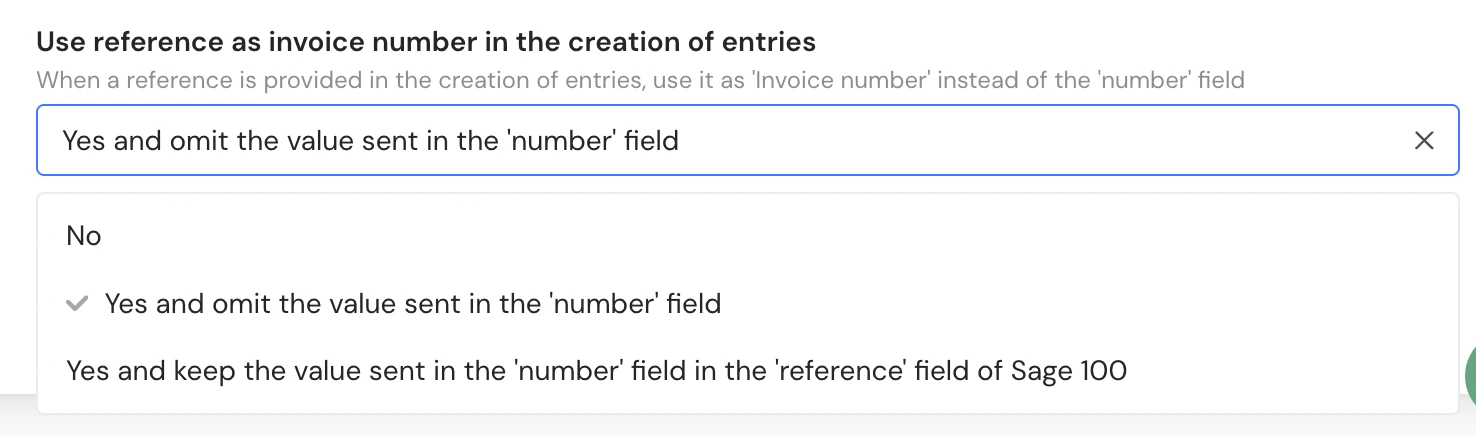
A configuration setting is available to control how the `number` and `reference` fields are used when creating entries in Sage 100. When enabled, the value sent in `reference` can be used as the invoice number in Sage 100 instead of the value sent in the `number` field.

* **Options:**
  * **No** — the `number` field is used as the invoice number.
  * **Yes and omit the value sent in the `number` field** — the `reference` value is used as the invoice number and the `number` value is ignored.
  * **Yes and keep the value sent in the `number` field in the `reference` field of Sage 100** — the `reference` value is used as the invoice number, and the `number` value is stored in the `reference` field of Sage 100.

## Test Sage 100

To test the software integration, you need to go through an integrator to get a sandbox account or you must identify beta users in your client base willing to allow you to use their account for testing.

## Connect Sage 100

To activate a connection with Sage 100, users will have to go through the following steps.

* French article: [Help Center - Sage100 FR](https://help.chift.app/articles/3664395354-sage-100-fr?lang=en) N.B.: Important to know that in France Sage only distributes through Integration partner - thus the client wishing to connect to Sage 100 will need the help of its Sage100 integration partner to do so.

## Coverage

<CoverageIframe api="accounting" connectors="Sage 100 FR" />

## Troubleshooting

### Specific errors for Sage 100:

| Error Code                                       | Error description                                                                                      | Resolution                                                                                  |
| ------------------------------------------------ | ------------------------------------------------------------------------------------------------------ | ------------------------------------------------------------------------------------------- |
| ERROR\_JOURNAL\_ALREADY\_OPEN                    | The accountant has the journal opened on his computer                                                  | The client cannot be on the same journal when the sync try to push data to Sage             |
| ERROR\_INVALID\_FIELD\_FORMAT\_ACCOUNT\_NUMBER   | The account number has a maximal length of 13 characters and must be a number in Sage 100.             | Shorten the account number to 13 characters or fewer and use only numeric characters.       |
| ERROR\_INVALID\_FIELD\_FORMAT\_INVOICE\_NUMBER   | The invoice number has a maximal length of 17 characters in Sage 100.                                  | Shorten the invoice number to 17 characters or fewer.                                       |
| ERROR\_INVALID\_FIELD\_FORMAT\_NAME              | The name has a maximal length of 17 characters in Sage 100.                                            | Shorten the name to 17 characters or fewer.                                                 |
| ERROR\_INVALID\_FIELD\_FORMAT\_NUMBER            | The number has a maximal length of 17 characters in Sage 100.                                          | Shorten the number to 17 characters or fewer.                                               |
| ERROR\_INVALID\_FIELD\_FORMAT\_OPERATION\_NUMBER | The operation number has a maximal length of 17 characters in Sage 100.                                | Shorten the operation number to 17 characters or fewer.                                     |
| ERROR\_ZERO\_LINE                                | You cannot create entries or operations with a line equal to zero in Sage 100.                         | Ensure all entry/operation lines have a non-zero amount.                                    |
| ERROR\_CONFIGURATION\_CONNECTION                 | No matching connection ID found in the settings.json.                                                  | Verify the connection ID is correctly configured in the settings.                           |
| ERROR\_INVALID\_FIELD\_FORMAT\_ID                | The format of the ID of the invoice doesn't seem to be correct.                                        | Provide a valid invoice ID in the correct format.                                           |
| ERROR\_JOURNAL\_NOT\_ACTIVE                      | The journal is not active in Sage 100.                                                                 | Activate the journal in Sage 100.                                                           |
| ERROR\_PARTNER\_ACCOUNT\_NOT\_SET\_UP            | The client/supplier has no collective account configured.                                              | Set up a collective account for the client/supplier in Sage 100.                            |
| ERROR\_ACCOUNT\_NUMBER\_NOT\_CONFIGURED          | The account number is not configured to be used in entries. Only detailed ledger accounts can be used. | Use a detailed ledger account instead of a summary account.                                 |
| ERROR\_TAX\_AMOUNT\_NOT\_CORRESPONDING           | The tax amount must be greater than zero, or must be zero when using a non-national tax code.          | Ensure the tax amount matches the requirements for the tax code type used.                  |
| ERROR\_PARTNER\_ACCOUNT\_MISSING                 | Please provide a client/supplier account in the partner\_id field.                                     | Include a client/supplier account in the partner\_id field.                                 |
| ERROR\_PARTNER\_NOT\_GOOD\_SCOPE                 | The partner must be a supplier for purchase entries, or a client/customer for sales entries.           | Use the correct partner type for the entry type (client for sales, supplier for purchases). |
| ERROR\_CHAREGE\_PRODUCT\_ACCOUNT\_MISSING        | Please provide at least one charge/product account.                                                    | Include at least one charge or product account in the entry.                                |
| ERROR\_PARTNER\_ALREADY\_OPEN                    | The client/supplier couldn't be updated because it is already open via the Sage 100 interface.         | Close the client/supplier record in the Sage 100 interface before updating.                 |
