{showTitle &&; export const ConnectorCardIframe = ({api = 'accounting', connectors}) => { const [theme, setTheme] = React.useState('light'); React.useEffect(() => { const checkTheme = () => { const isDark = document.documentElement.classList.contains('dark'); setTheme(isDark ? 'dark' : 'light'); }; checkTheme(); const observer = new MutationObserver(checkTheme); observer.observe(document.documentElement, { attributes: true, attributeFilter: ['class'] }); return () => observer.disconnect(); }, []); const queryParams = new URLSearchParams({ api, theme, ...connectors ? { connectors } : {} }); const iframeUrl = `https://chift-coverage-matrix.s3.eu-west-3.amazonaws.com/connector-card.html?${queryParams.toString()}`; return ; }; export const CoverageIframe = ({api = 'accounting', connectors}) => { const [theme, setTheme] = React.useState('light'); const [isFullscreen, setIsFullscreen] = React.useState(false); const [currentIframeUrl, setCurrentIframeUrl] = React.useState(null); const iframeRef = React.useRef(null); React.useEffect(() => { const checkTheme = () => { const isDark = document.documentElement.classList.contains('dark'); setTheme(isDark ? 'dark' : 'light'); }; checkTheme(); const observer = new MutationObserver(checkTheme); observer.observe(document.documentElement, { attributes: true, attributeFilter: ['class'] }); return () => observer.disconnect(); }, []); React.useEffect(() => { const handleFullscreenChange = () => { setIsFullscreen(!!document.fullscreenElement); }; document.addEventListener('fullscreenchange', handleFullscreenChange); return () => document.removeEventListener('fullscreenchange', handleFullscreenChange); }, []); React.useEffect(() => { const handleMessage = event => { if (!event.origin.includes('chift-coverage-matrix.s3.eu-west-3.amazonaws.com')) return; if (event.data?.type === 'urlChange' && event.data?.url) { setCurrentIframeUrl(event.data.url); } }; window.addEventListener('message', handleMessage); return () => window.removeEventListener('message', handleMessage); }, []); const queryParams = new URLSearchParams({ api, theme, ...connectors ? { connectors } : {} }); const iframeUrl = `https://chift-coverage-matrix.s3.eu-west-3.amazonaws.com/coverage.html?${queryParams.toString()}`; const openUrl = currentIframeUrl || iframeUrl; const toggleFullscreen = () => { if (!document.fullscreenElement) { iframeRef.current?.requestFullscreen(); } else { document.exitFullscreen(); } }; const isDark = theme === 'dark'; const buttonStyle = { display: 'inline-flex', alignItems: 'center', gap: '8px', padding: '4px 12px', fontSize: '14px', fontWeight: '500', color: isDark ? '#d4d4d4' : '#374151', backgroundColor: 'transparent', border: `1px solid ${isDark ? '#404040' : '#e5e7eb'}`, borderRadius: '12px', cursor: 'pointer', textDecoration: 'none', transition: 'all 0.15s ease' }; const hoverBg = isDark ? 'rgba(255,255,255,0.05)' : 'rgba(0,0,0,0.03)'; const hoverBorder = isDark ? '#525252' : '#d1d5db'; const defaultBg = 'transparent'; const defaultBorder = isDark ? '#404040' : '#e5e7eb'; return <>Overview legend 🧭
}
Column Value Meaning Geography 🇫🇷 FR · 🇧🇪 BE · … Countries where the connector is officially supported. Software type SaaS Through API. On-premise (local agent) Software running locally — installation of a local agent is required. On-premise (API) Software running locally — API available. Status 🔵 Live Connector is generally available and production-ready. 🟣 Beta Connector is in beta — usable in production but may still evolve. Multi folder ✅ Yes / ❌ No Connection to multiple accounting folders at the same time (see{' '} accounting folders guide ). Rate limits ✅ No / ❌ Yes Whether the target software sets rate limits on API calls. API keys ❎ No No API keys required (OAuth2 client secret and client ID). No requirements to activate the connector — you can create a connection. 🔑 Keys are required to activate the connector. Chift cannot act as intermediary to obtain them; we can still assist with steps to get keys directly from the software provider. 🔑 ☑️ via Chift Keys are required to activate the connector. You can go through Chift to get the keys (intermediary or partnership keys). An approval process may still apply, but you do not need to request keys from the vendor on your own. Approval / certification process ⚡ Instant No keys required, or Chift can encode their keys for you when requested. Activation is instantaneous. 🟢 Approval — [Duration] Approval will be granted. The vendor may require information or app configuration in a developer portal before issuing keys. 🟠 Approval — [Duration] Approval is not guaranteed — often due to integration strategy; the vendor may do a deeper assessment (competitors, partnership requirements, and similar). Activation time ⚡ Instant If no keys are required, or Chift has keys ready to share with you. Time Estimated time to get the connector activated in production as a result of the approval or certification process (e.g. ⏱️ 2 days, 1 week). Extra fees — software editor ❎ No No fees charged by the software editor. 💰 🕹️ Fees associated with obtaining a testing account. 💰 🔑 Fees charged to get API keys. Extra fees — end user ❎ No The end user does not pay extra to get integrated. 💰 Yes The end user must pay extra to get integrated. Comments on costs — Additional notes on fees or pricing when relevant. Sandbox account ✅ via Chift Chift can provide you with a sandbox. 🟠 Only through integrator Only the software's integrator can provide a sandbox. ✅ Self-service You can create your own sandbox. ✅ Trial account It is possible to create a trial account.
; };Matrix Legend 🧭
Status Meaning ✅ Implemented Endpoint is implemented and available. ❌ Not supported Endpoint is not supported by the target software (connector limitation). Cannot be implemented. 💬 On request Endpoint is not implemented but feasibility is validated. Can be implemented on request — contact your Chift point of contact to discuss scope and timing. 🔎 To be analyzed Endpoint is not implemented and feasibility has not yet been fully assessed. Analysis is pending.
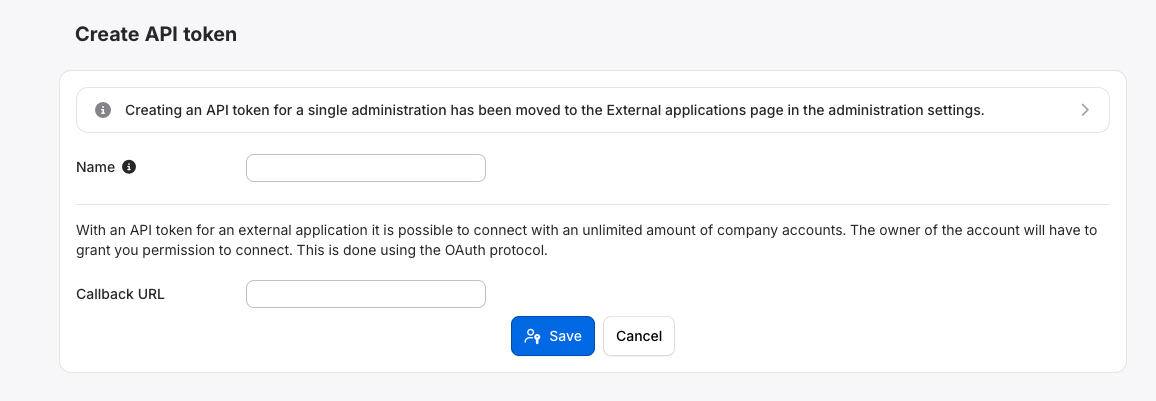 See as well the official Moneybird documentation [here](https://developer.moneybird.com/introduction)
4. Go to your account, connectors menu and activate Moneybird in one click. Then, you will be asked to provide your Moneybird client ID & secret.
5. Most of the scopes are mandatory. The "bank" scope can be added as well depending on your use case (using bank endpoints).
## Test Moneybird
To test the software integration, you can use the sandbox account you created during the configuration process (step 2). You can create multiple sandbox accounts for free if needed.
## Connect Moneybird
To activate a connection with Moneybird, users will have to go through the following steps.
* French article: [Help Center - Moneybird - FR](https://help.chift.app/articles/5590047986-moneybird?lang=fr)
* English article: [Help Center - Moneybird - EN](https://help.chift.app/articles/5590047986-moneybird?lang=en)
## Rate limits
The Moneybird API throttles requests on a **per IP-address basis**:
* **150 requests per 5 minutes** across all endpoints.
* **50 requests per 5 minutes** for the stricter `/reports/` endpoints.
When the limit is exceeded, the API responds with a **429 Too many requests** error. For short-term rate limits, Chift automatically retries the request to maximize the success rate. More details: [https://docs.chift.eu/developer-guides/rate-limits](https://docs.chift.eu/developer-guides/rate-limits)
Partners with popular OAuth applications can request a **per-administration limit** instead of IP-based limits, and volume-based agreements are possible for high-volume accounts — both require contacting Moneybird support directly.
More details: [developer.moneybird.com/introduction#throttling](https://developer.moneybird.com/introduction#throttling)
## Coverage
See as well the official Moneybird documentation [here](https://developer.moneybird.com/introduction)
4. Go to your account, connectors menu and activate Moneybird in one click. Then, you will be asked to provide your Moneybird client ID & secret.
5. Most of the scopes are mandatory. The "bank" scope can be added as well depending on your use case (using bank endpoints).
## Test Moneybird
To test the software integration, you can use the sandbox account you created during the configuration process (step 2). You can create multiple sandbox accounts for free if needed.
## Connect Moneybird
To activate a connection with Moneybird, users will have to go through the following steps.
* French article: [Help Center - Moneybird - FR](https://help.chift.app/articles/5590047986-moneybird?lang=fr)
* English article: [Help Center - Moneybird - EN](https://help.chift.app/articles/5590047986-moneybird?lang=en)
## Rate limits
The Moneybird API throttles requests on a **per IP-address basis**:
* **150 requests per 5 minutes** across all endpoints.
* **50 requests per 5 minutes** for the stricter `/reports/` endpoints.
When the limit is exceeded, the API responds with a **429 Too many requests** error. For short-term rate limits, Chift automatically retries the request to maximize the success rate. More details: [https://docs.chift.eu/developer-guides/rate-limits](https://docs.chift.eu/developer-guides/rate-limits)
Partners with popular OAuth applications can request a **per-administration limit** instead of IP-based limits, and volume-based agreements are possible for high-volume accounts — both require contacting Moneybird support directly.
More details: [developer.moneybird.com/introduction#throttling](https://developer.moneybird.com/introduction#throttling)
## Coverage