> ## Documentation Index
> Fetch the complete documentation index at: https://docs.chift.eu/llms.txt
> Use this file to discover all available pages before exploring further.
# Chifty, your integration assistant
> Ask why an integration is failing and get a diagnosis with the next action
When an integration fails, finding out why usually means digging through connection states, API logs and third-party error messages. Chifty, the AI assistant built into the Chift platform, does that digging for you: ask a question in plain language and it queries your account data live, then answers with a diagnosis and the concrete next action.
## See it in action
Ask why a consumer is not working. Chifty checks its connections, scans the recent API calls, opens the failing ones and reads the actual error returned by the third-party system:
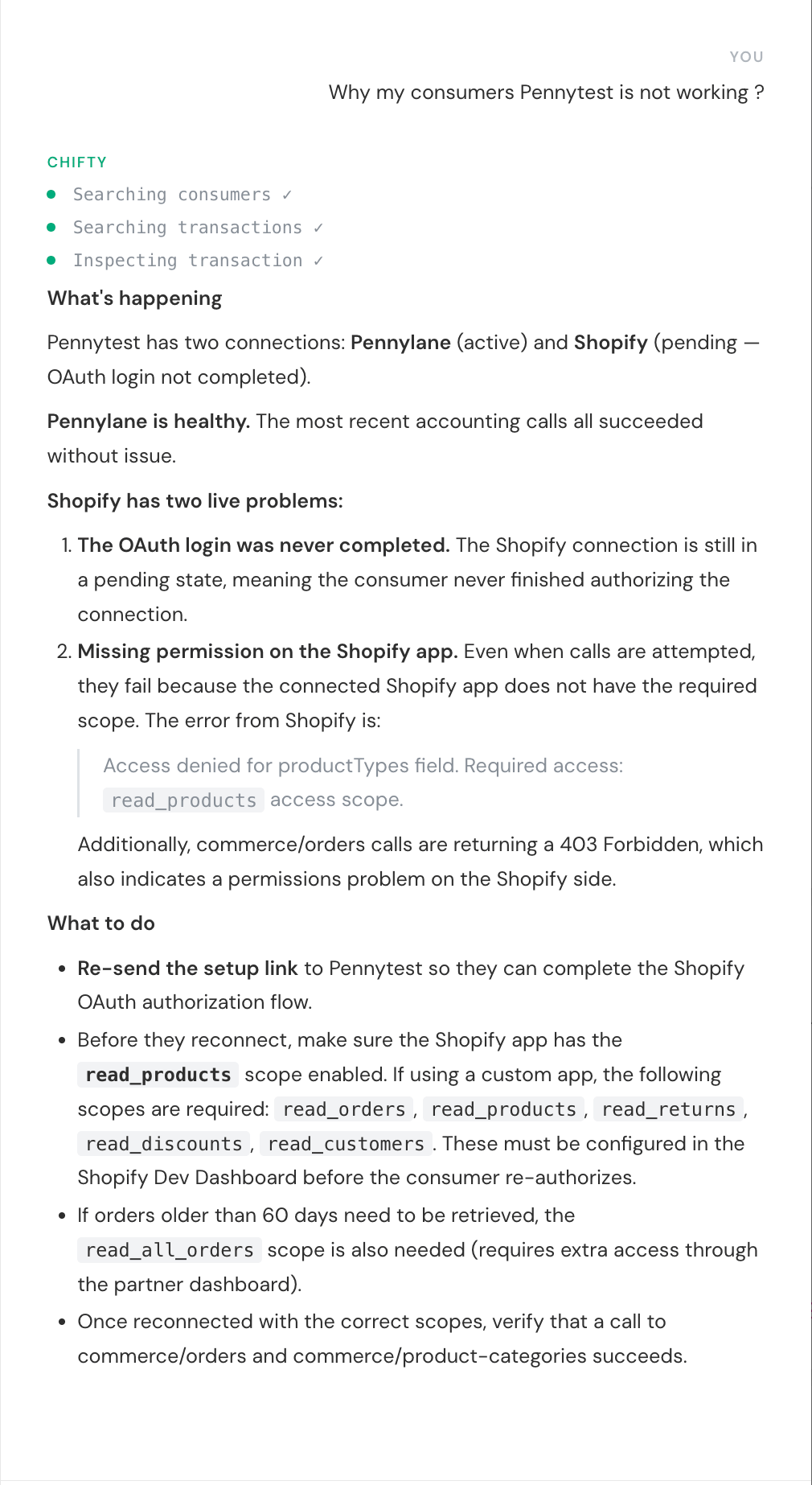 Every answer follows the same shape:
* **What's happening**: the state of each connection and what is really broken, quoting the third-party error. Here Chifty spots that the Shopify connection was never authorized and that the app is missing the `read_products` access scope.
* **What to do**: the concrete fix. Here, re-send the setup link so the consumer completes the OAuth flow, with the exact scopes to request.
While it works, Chifty shows each step it takes, so you always know where an answer comes from:
Every answer follows the same shape:
* **What's happening**: the state of each connection and what is really broken, quoting the third-party error. Here Chifty spots that the Shopify connection was never authorized and that the app is missing the `read_products` access scope.
* **What to do**: the concrete fix. Here, re-send the setup link so the consumer completes the OAuth flow, with the exact scopes to request.
While it works, Chifty shows each step it takes, so you always know where an answer comes from:
 Ask in your own words, in your own language. Some questions that work well:
* "What's going on with Acme Corp?"
* "Is the local agent of Acme Corp connected?"
* "How do I set up an Exact Online connection?"
## Where to find it
Open Chifty from the button at the bottom of the platform sidebar. Conversations are saved per user: start a new chat anytime and pick up previous ones from the history.
Chifty is in beta, available on all Unified API accounts. Support for Syncs accounts is coming.
## Good to know
* Chifty only **reads** data. It cannot modify consumers, connections or configuration.
* Answers are scoped to your current account and environment, and respect your user permissions: Chifty cannot show you data you could not see in the platform yourself.
* It uses the Chift connector documentation (setup steps, prerequisites, known issues) to give precise, connector-aware guidance.
Ask in your own words, in your own language. Some questions that work well:
* "What's going on with Acme Corp?"
* "Is the local agent of Acme Corp connected?"
* "How do I set up an Exact Online connection?"
## Where to find it
Open Chifty from the button at the bottom of the platform sidebar. Conversations are saved per user: start a new chat anytime and pick up previous ones from the history.
Chifty is in beta, available on all Unified API accounts. Support for Syncs accounts is coming.
## Good to know
* Chifty only **reads** data. It cannot modify consumers, connections or configuration.
* Answers are scoped to your current account and environment, and respect your user permissions: Chifty cannot show you data you could not see in the platform yourself.
* It uses the Chift connector documentation (setup steps, prerequisites, known issues) to give precise, connector-aware guidance.